Summary of concepts for AWS SysOps Administrator Certification.
CloudWatch
AWS CloudWatch Metrics
CloudWatch provides metrics for every services in AWS
Metricis a variable to monitor (CPUUtilization, NetworkIn…)- Metrics belong to
namespaces - Dimension is an attribute of a metric (instance id, environment, etc…).
- Up to 30 dimensions per metric
- Metrics have
timestamps - Can create CloudWatch dashboards of metrics
AWS Provided metrics (AWS pushes them):
BasicMonitoring (default): metrics are collected at a5 minuteinternalDetailedMonitoring (paid): metrics are collected at a1 minuteinterval- Includes
CPU, Network, Disk and Status Check Metrics
Custom metric (yours to push):
- Basic Resolution: 1 minute resolution
- High Resolution: all the way to 1 second resolution
- Include
RAM, application level metrics - Make sure the IAM permissions on the EC2 instance role are correct !
RAM is NOT included in the AWS EC2 metrics
CloudWatch Custom Metrics
You can retrieve custom metrics from your applications or services using the StatsD and collectd protocols. StatsD is supported on both Linux servers and servers running Windows Server. collectd is supported only on Linux
Possibility to define and send your own custom metrics to CloudWatch
Example: memory (RAM) usage, disk space, number of logged in users …
Use API call
PutMetricDataAbility to use dimensions (attributes) to segment metrics
- Instance.id
- Environment.name
Metric resolution (
StorageResolutionAPI parameter - two possible value):- Standard: 1 minute (60 seconds)
- High Resolution: 1/5/10/30 second(s) - Higher cost
Important
👀 EXAM:Accepts metric data points two weeks in the past and two hours in the future (make sure to configure your EC2 instance time correctly)You can
use AWS CLI or APItouploadthedata metricsto CloudWatch.
1 | aws cloudwatch put-metric-data --metric-name PageViewCount --namespace MyService --value 2 --timestamp 2023-01-01-14T08:00:00.000Z |
- high-resolution: high-resolution custom metric, your applications can publish metrics to CloudWatch with 1-second resolution. High-Resolution Alarms allow you to react and take actions faster and support the same actions available today with standard 1-minute alarms.
CloudWatch Dashboards
- Great way to setup custom dashboards for quick access to key metrics and alarms
Dashboards are global- ``Dashboards can include graphs from different AWS accounts and regions``** -
👀 EXAM - You can change the time zone & time range of the dashboards
- You can setup automatic refresh (10s, 1m, 2m, 5m, 15m)
- Dashboards can be shared with people who don’t have an AWS account (public, email address, 3rd party SSO provider through Amazon Cognito)
CloudWatch Logs - Sources
- SDK, CloudWatch Logs Agent, CloudWatch Unified Agent
- Elastic Beanstalk: collection of logs from application
- ECS: collection from containers
- AWS Lambda: collection from function logs
- VPC Flow Logs: VPC specific logs
- API Gateway
- CloudTrail based on filter
- Route53: Log DNS queries
CloudWatch Logs Subscriptions
Get a real-time log events from CloudWatch Logs for processing and analysis- Send to Kinesis Data Streams, Kinesis Data Firehose, or Lambda
Subscription Filter- filter which logs are events delivered to your destinationCross-Account Subscription- send log events to resources in a different AWS account (KDS, KDF)
Alarms
CloudWatch alarms allow you to monitor metrics and trigger actions based on defined thresholds. In this case, you can create a CloudWatch alarm that monitors the CPU utilization metric of the EC2 instance. When the CPU utilization reaches 100%, the alarm will be triggered, and you can configure actions such as sending notifications or executing automated actions to address the unresponsiveness issue.
Alarm Targets - 👀 EXAM
EC2- Stop, Terminate, Reboot, or Recover an EC2 InstanceEC2 Auto Scaling- Trigger Auto Scaling Action, scaling up or down.SNS- Send notification to SNS (from which you can do pretty much anything)creating a
Systems Manager OpsItem.Composite Alarms are monitoring the states of multiple other alarms
EC2 Instance Recovery
StatusCheckFailed_System
Status Check:
Instance status = check the EC2 VMSystem status = check the underlying hardware
Recovery: Same Private, Public, Elastic IP, metadata, placement group👀 Alarms can be created based on CloudWatch Logs Metrics FiltersTest an alarm using
aws set-alarm-state
1 | 👀 aws cloudwatch set-alarm-state --alarm-name "TerminateInHighCPU" --state-value ALARM --state-reason "testing purposes" |
CloudWatch Synthetics
CloudWatch Synthetics canaries are automated/configurable scripts that monitor the availability and performance of applications, endpoints, and APIs. They are designed to simulate user interactions with an application and provide insights into its behavior.
Canaries are created using scripts written in Node.js or Python and are scheduled to run at regular intervals. These scripts perform tasks such as navigating through a website, clicking on specific elements, submitting forms, and validating responses. By executing these predefined actions, canaries can monitor the functionality, responsiveness, and performance of an application or API.
CloudWatch Synthetics canaries collect data on metrics like response time, latency, availability, and success rates. They can also be configured to generate alarms when certain conditions are met, allowing proactive identification and remediation of issues.
Reference
https://docs.aws.amazon.com/awssupport/latest/user/trusted-advisor-check-reference.html
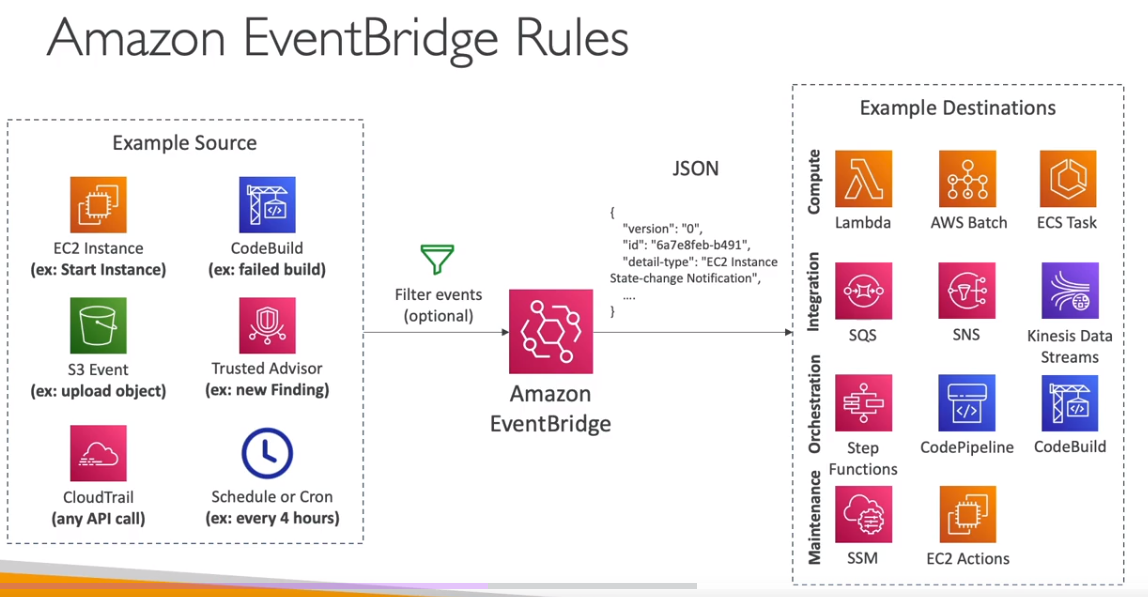
Amazon EventBridge (formerly CloudWatch Events)
- Schedule: Cron jobs (scheduled scripts) - Schedule Every hour -> Trigger script on Lambda function
- Event Pattern: Event rules to react to a service doing something - IAM Root User Sign in Event -> SNS Topic with Email Notification
- Trigger Lambda functions, send SQS/SNS messages…
Service Quotas CloudWatch Alarms
- Notify you when you’re close to a service quota value threshold
- Create CloudWatch Alarms on the Service Quotas console
- Example: Lambda concurrent executions
- Helps you know if you need to request a quota increase or shutdown resources before limit is reached
Alternative: Trusted Advisor CW Alarms
- Limited number of Service Limits checks in Trusted Advisor (~50)
- Trusted Advisor publishes its check results to CloudWatch
👀 For each production EC2 instance, create an Amazon CloudWatch alarm for Status Check Failed: System. Set the alarm action to recover the EC2 instance. Configure the alarm notification to be published to an Amazon Simple Notification Service (Amazon SNS) topic.
Explanation: By creating a CloudWatch alarm for Status Check Failed: System, you can automate the recovery task of EC2 instances (stop, terminate, reboot, or recover your Amazon EC2 instances). When the system health check fails for an EC2 instance, the alarm will be triggered and perform the configured action to recover the instance. This eliminates the need for manual intervention. Additionally, configuring the alarm to publish notifications to an SNS topic allows you to receive notifications whenever a system health check fails.
Status Check
Automated checks to identify hardware and software issues.
System Status Checks
- Monitors problems with AWS systems (software/hardware issues on the physical host, loss of system power, …)
- Check
Personal Health Dashboardfor any scheduled critical maintenance by AWS to your instance’s host - Resolution: stop and start the instance (instance migrated to a new host)
- Either wait for AWS to fix the host, OR
- Move the EC2 instance to a new host = STOP & START the instance (if EBS backed) Instance Status Checks
- Monitors software/network configuration of your instance (invalid network configuration, exhausted memory, …)
- Resolution: reboot the instance or change instance configuration.
Status Checks - CW Metrics & Recovery - 👀 EXAM
- CloudWatch Metrics (1 minute interval)
StatusCheckFailed_SystemStatusCheckFailed_InstanceStatusCheckFailed(for both)
- Option 1:
CloudWatch Alarm- Recover EC2 instance with the same private/public IP, EIP, metadata, and Placement Group
- Send notifications using SNS trigger
- Option 2:
Auto Scaling Group- Set min/max/desired 1 to recover an instance but
won't keep the same private and elastic IP.`
- Set min/max/desired 1 to recover an instance but
Determine which instance use the most bandwidth
NetworkIn and NetworkOut
Identify the processing power required
👀 CPUUtilization specifies the percentage of allocated EC2 compute units that are currently in use on the instance. This metric identifies the processing power required to run an application on a selected instance. This metric is expressed in Percent.
Number of users.
👀 ActiveConnectionCount This metric represents the total number of concurrent TCP connections active from clients to the load balancer and from the load balancer to targets.
RAMUtilization is NOT available as an EC2 metric
RAMUtilization You can publish your own metrics to CloudWatch using the AWS CLI or an API. You can view statistical graphs of your published metrics with the AWS Management Console. Metrics produced by AWS services are standard resolution by default.
5xx server errors
To monitor the number of 500 Internal Error responses that you’re getting, you can enable Amazon CloudWatch metrics. Amazon S3 CloudWatch request metrics include a metric for 5xx server errors.
4xxx
You can set an alarm to notify operators when the 404 filter metric exceeds a threshold.
👀 HTTPCode_ELB_4XX_Count metric stands for the number of HTTP 4XX client error codes that originate from the load balancer. This count does not include response codes generated by targets.
Events
You can run CloudWatch Events rules according to a schedule.
EBS Snapshots
It is possible to create an automated snapshot of an existing Amazon Elastic Block Store (Amazon EBS) volume on a schedule. You can choose a fixed rate to create a snapshot every few minutes or use a cron expression to specify that the snapshot is made at a specific time of day.
Snapshots are incremental backups, which means that only the blocks on the device that have changed after your most recent snapshot are saved. This minimizes the time required to create the snapshot and saves on storage costs by not duplicating data. Each snapshot contains all of the information that is needed to restore your data (from the moment when the snapshot was taken) to a new EBS volume.
Reference: Schedule Automated Amazon EBS Snapshots Using CloudWatch Events
Filters - QUESTION
You can create a count of 404 errors and exclude other 4xx errors with a filter pattern on 404 errors.
Agents
If your AMI contains a CloudWatch agent, it’s automatically installed on EC2 instances when you create an EC2 Auto Scaling group. With the stock Amazon Linux AMI, you need to install it (AWS recommends to install via yum).
Install Agents to track the state of each of the instances
You must attach the CloudWatchAgentServerRole IAM role to the EC2 instance to be able to run the CloudWatch agent on the instance. This role enables the CloudWatch agent to perform actions on the instance.
Publish custom metrics to CloudWatch.
You can publish your own metrics to CloudWatch using the AWS CLI or an API. You can view statistical graphs of your published metrics with the AWS Management Console. CloudWatch stores data about a metric as a series of data points. Each data point has an associated time stamp. You can even publish an aggregated set of data points called a statistic set.
The put-metric-data command publishes metric data to Amazon CloudWatch, which associates it with the specified metric. If the specified metric does not exist, CloudWatch creates the metric which can take up to fifteen minutes for the metric to appear in calls to ListMetrics.
Collect process metrics with the procstat plugin
The procstat plugin enables you to collect metrics from individual processes. It is supported on Linux servers and on servers running Windows Server 2012 or later.
Dashboard Body Structure and Syntax - EXAM
A DashboardBody is a string in JSON format. It can include an array of between 0 and 500 widget objects, as well as a few other parameters. The dashboard must include a widgets array, but that array can be empty.
When deploying resources using AWS CloudFormation, the goal is often to define as much of the desired infrastructure as possible directly within the template. This is achieved by taking the JSON representation of the prototype dashboard and embedding it directly within the CloudFormation template using the DashboardBody property.
1 | Resources: |
CloudTrail
Provides governance, compliance and audit for your AWS Account
- CloudTrail is
enabled by default! - Get
an history of events / API calls made within your AWS Accountby:- Console
- SDK
- CLI
- AWS Services
- Can put logs from CloudTrail into CloudWatch Logs or S3
A trail can be applied to All Regions (default) or a single Region- If a resource is deleted in AWS, investigate CloudTrail first!
CloudTrail Insights
- 👀 Enable
CloudTrail Insights to detect unusual activityin your account:- inaccurate resource provisioning
- hitting service limits
- Bursts of AWS IAM actions
- Gaps in periodic maintenance activity
- CloudTrail Insights analyzes normal management events to create a baseline
- And then
continuously analyzes write events to detect unusual patterns.- Anomalies appear in the CloudTrail console
- Event is sent to Amazon S3
- An EventBridge event is generated (for automation needs)
CloudTrail - Integration with EventBridge
- Used to react to any API call being made in your account
- CloudTrail is not “real-time”:
- Delivers an event within 15 minutes of an API call
- Delivers log files to an S3 bucket every 5 minutes
CloudTrail - Organizations Trails
- A trail that will log all events for all AWS accounts in an AWS Organization
- Log events for management and member accounts
- Trail with the same name will be created in every AWS account (IAM permissions)
- Member accounts can’t remove or modify the organization trail (view only)
CloudTrail - Log File Integrity Validation
Digest Files:
References the log files for the last hour and contains a hash of each
Stored in the same S3 bucket as log files (different folder)
Helps you determine whether a log file was modified/deleted after CloudTrail delivered itHashing using SHA-256, Digital Signing using SHA- 256 with RSĂProtect the S3 bucket using bucket policy, versioning, MFA Delete protection, encryption, object lockProtect files using IAM
Q. To ensure that SysOps administrators can easily verify that the CloudTrail log files have not been deleted or changed, the following action should be taken:
Enable
CloudTrail log file integrity validationwhen the trail is created or updated.Explanation: EnablingCloudTrail log file integrity validationensures that the log files are protected against tampering or unauthorized modification. CloudTrail uses SHA-256 hashes to validate the integrity of the log files stored in Amazon S3. By enabling this feature, the SysOps administrators can easily verify the integrity of the log files and ensure that they have not been deleted or changed
Cloud Trail - Integration with EventBridge AWS CloudTrail
- Used to react to any API call being made in your account
- Cloud Trail is not “real-time”:
- Delivers an event within 15 minutes of an API call
- Delivers log files to an S3 bucket every 5 minutes
CloudTrail - Organizations Trails
- A trail that will log all events for all AWS accounts in an AWS Organization
- Log events for management and member accounts
- Trail with the same name will be created in every AWS account (IAM permissions)
Member accounts can’t remove or modify the organization trail (view only)
👀 AWS Config
- Helps with
auditingand recordingcomplianceof your AWS resources. - Helps
record configurationsand changes over time. Questions that can be solved by AWS Config:- Is there unrestricted SSH access to my security groups?
- Do my buckets have any public access?
- How has my ALB configuration changed over time?
- You can
receive alerts(SNS notifications) for any changes - AWS Config is a
per-region service. - Can be aggregated across regions and accounts.
- Possibility of storing the configuration data into S3 (analyzed by Athena)
AWS Config keeps track of the configuration of your AWS resources and their relationships to other resources. It can also evaluate those AWS resources for compliance. This service uses rules that can be configured to evaluate AWS resources against desired configurations.
For example,
- can track
changestoCloudFormation stacks.
AWS Config can track changes to CloudFormation stacks. A CloudFormation stack is a collection of AWS resources that you can manage as a single unit. With AWS Config, you can review the historical configuration of your CloudFormation stacks and review all changes that occurred to them.
For more information about how AWS Config can track changes to CloudFormation deployments, see cloudformation-stack-drift-detection-check.
- there are AWS Config
rulesthatcheckwhether or not yourAmazon S3 buckets have logging enabledor yourIAM users have an MFA device enabled.
👀 AWS Config is a service that enables you to assess, audit, and evaluate the configurations of your AWS resources. It provides detailed inventory and configuration history of your resources, as well as configuration change notifications. With AWS Config, you can track the configuration of your S3 bucket, including its bucket policy.
AWS Config rules use AWS Lambda functions to perform the compliance evaluations, and the Lambda functions return the compliance status of the evaluated resources as compliant or noncompliant. The non-compliant resources are remediated using the remediation action associated with the AWS Config rule. With the Auto-Remediation feature of AWS Config rules, the remediation action can be executed automatically when a resource is found non-compliant.
AWS Config Auto Remediation feature has auto remediate feature for any non-compliant S3 buckets using the following AWS Config rules:
s3-bucket-logging-enabled s3-bucket-server-side-encryption-enabled s3-bucket-public-read-prohibited s3-bucket-public-write-prohibited
These AWS Config rules act as controls to prevent any non-compliant S3 activities.
Config Rules
AWS Config provides a number of AWS managed rules that address a wide range of security concerns such as checking if you encrypted your Amazon Elastic Block Store (Amazon EBS) volumes, tagged your resources appropriately, and enabled multi-factor authentication (MFA) for root accounts.
- Can use AWS
managedconfigrules(over 75) - Can make
custom config rules (must be defined in AWS Lambda).- Ex: evaluate if each EBS disk is of type gp2
- Ex: evaluate if each EC2 instance is t2.micro
- Rules can be evaluated / triggered:
- For each config change
- And / or: at regular time intervals
AWS Config Rules does not prevent actions from happening (no deny).
Managed rules:
require-tags: managed rule in AWS Config. This rule checks if a resource contains the tags that you specify.
Config Rules - Remediations
Has auto remediate feature for any non-compliant S3 buckets using the following AWS Config rules:
s3-bucket-logging-enabled s3-bucket-server-side-encryption-enabled s3-bucket-public-read-prohibited s3-bucket-public-write-prohibited
These AWS Config rules act as controls to prevent any non-compliant S3 activities.
Automate remediation of non-compliant resources using SSM Automation Documents.- Use AWS-Managed Automation Documents or create custom Automation Documents
Tip: you can create custom Automation Documents that invokes Lambda function.
- You can set
Remediation Retriesif the resource is still non-compliant after autoremediation.
AWS Config Auto Remediation
Config Rules - Notifications
- Use EventBridge to trigger notifications when AWS resources are noncompliant
- Ability to send configuration changes and compliance state notifications to SNS (all events - use SNS Filtering or filter at client-side)
👀 QUESTION- If there are EC2s that are terminated in an environment, you should use the
[EIP-attached Config rule](https://docs.aws.amazon.com/config/latest/developerguide/eip-attached.html)to find EIPs that are unattached in your environment.
AWS Config - Aggregators
- The aggregator is created
in one central aggregator account. - Aggregates
rules, resources, etc... across multiple accounts & regions. - If using
AWS Organizations, no need for individual Authorization - Rules are created in each individual source AWS account
- Can
deploy rulesto multiple target accounts usingCloudFormation StackSets
CloudWatch vs CloudTrail vs Config
- CloudWatch
- Performance monitoring (metrics, CPU, network, etc…) & dashboards
- Events & Alerting
- Log Aggregation & Analysis
- CloudTrail
- Record API calls made within your Account by everyone
- Can define trails for specific resources
- Global Service
- Config
- Record configuration changes
- Evaluate resources against compliance rules
- Get timeline of changes and compliance
AWS Task Orchestrator and Executor (AWSTOE) - 👀 EXAM
Use the AWS Task Orchestrator and Executor (AWSTOE) application to orchestrate complex workflows, modify system configurations, and test your systems without writing code. This application uses a declarative document schema. Because it is a standalone application, it does not require additional server setup.
`AWS Artifact - 👀 EXAM
AWS Artifact keeps compliance-related reports and agreements.
RDS
Advantage over using RDS versus deploying
- RDS is a managed service:
- Automated provisioning, OS patching
- Continuous backups and restore to specific timestamp (Point in Time Restore)!
- Monitoring dashboards
- Read replicas for improved read performance
- Multi AZ setup for DR (Disaster Recovery)
- Maintenance windows for upgrades
- Scaling capability (vertical and horizontal)
- Storage backed by EBS (gp2 or io1)
- BUT you can’t SSH into your instances
RDS Read Replicas for read scalability
- Up to 15 Read Replicas
- Within
AZ, Cross AZ or Cross Region. - Replication is
ASYNC. - Replicas can be promoted to their own DB.
RDS Read Replicas - Network Cost
- In AWS there’s a network cost when data goes from one AZ to another
For RDS Read Replicas within the same region, you don’t pay that fee.
RDS Multi AZ (Disaster Recovery)
SYNCreplication.- One DNS name - automatic app failover to standby
- Increase
availability. - Failover in case of loss of AZ, loss of network, instance or storage failure
👀 Exam - The Read Replicas be setup as Multi AZ for Disaster Recovery (DR).
Lambda in VPC
- You must define the VPC ID, the Subnets and the Security Groups
- Lambda will create an ENI (Elastic Network Interface) in your subnets
AWSLambdaVPCAccessExecutionRole
RDS Proxy for AWS Lambda
- When using Lambda functions with RDS, it opens and maintains a database connection
- This can result in a
“TooManyConnections”exception - With
RDS Proxy, you no longer need code that handles cleaning up idle connections and managing connection pools
DB Parameter Groups
You can configure the DB engine using Parameter Groups
Dynamic parameters are applied immediately
Static parameters are applied after instance reboot
You can modify parameter group associated with a DB (must reboot)
Must-know parameter:- PostgreSQL / SQL Server:
rds.force_ssl=1=> force SSL connections - MySQL / MariaDB:
require_secure_transport=1 => force SSL connections
- PostgreSQL / SQL Server:
RDS Events & Event Subscriptions
RDS keeps record of events related to:
DB instances
Snapshots
Parameter groups, security groups …
RDS Event Subscriptions
- Subscribe to events to be notified when an event occurs using SNS
- Specify the Event Source (instances, SGs, …) and the Event Category (creation, failover, …)
RDS delivers events to EventBridge
RDS with CloudWatch
CloudWatch metrics associated with RDS (gathered from the hypervisor):
DatabaseConnectionsSwapUsageReadIOPS / WriteIOPSReadLatency / WriteLatencyReadThroughPut / WriteThroughPutDiskQueueDepthFreeStorageSpace- To monitor the available storage space for an RDS DB instanceBinLogDiskUsage: Tracks the amount of disk space occupied by binary logs on the master.
FreeableMemory: Tracks the amount of available random access memory and not the available storage space.
DiskQueueDepth: Provides the number of outstanding IOs (read/write requests) waiting to access the disk.
Enhanced Monitoring(gathered from an agent on the DB instance).👀- Useful when you need to see how
different processes or threads use the CPU.
- Useful when you need to see how
Access to over 50 new CPU, memory, file system, and disk I/O metrics
Amazon RDS provides metrics in real time for the operating system (OS) that your DB instance runs on. You can view the metrics for your DB instance using the console. Also, you can consume the `Enhanced Monitoring`` JSON output from Amazon CloudWatch Logs in a monitoring system of your choice.
RDS storage autoscaling - 👀 EXAM
With RDS storage autoscaling, you can set the desired maximum storage limit. Autoscaling will manage the storage size. RDS storage autoscaling monitors actual storage consumption and then scales capacity automatically when actual utilization approaches the provisioned storage capacity.
Amazon Aurora DB
- Aurora is a proprietary technology from AWS (not open sourced)
- Postgres and MySQL are both supported as Aurora DB (that means your drivers will work as if Aurora was a Postgres or MySQL database)
- Aurora is “AWS cloud optimized” and claims 5x performance improvement over MySQL on RDS, over 3x the performance of Postgres on RDS
Aurora storage automatically grows in increments of 10GB, up to 128 TB.- Aurora can have up to 15 replicas and the replication process is faster than MySQL (sub 10 ms replica lag)
- Failover in Aurora is instantaneous. It’s HA (High Availability) native.
- Aurora costs more than RDS (20% more) - but is more efficient
Aurora High Availability and Read Scaling
One Aurora Instance takes writes (master)
Support for Cross Region ReplicationShared storage Volume: Replication + Self Healing + Auto expandingReader Endpoint Connection Load Balancing
RDS & Aurora Security
At-rest encryption:- Database master & replicas encryption using AWS KMS - must be defined as launch time
- If the master is not encrypted, the read replicas cannot be encrypted To encrypt an un-encrypted database, go through a DB snapshot & restore as encrypted
In-flight encryption: TLS-ready by default, use the AWS TLS root certificates client-sideIAM Authentication: IAM rolesto connect to your database (instead of username/pw)Security Groups: Control Network access to your RDS / Aurora DBNo SSH available except on RDS CustomAudit Logs can be enabled and sent to CloudWatch Logs for longer retention
Aurora for SysOps
You can associate a priority tier (0-15) on each Read Replica
- Controls the failover priority
- RDS will promote the Read Replica with the highest priority (lowest tier)
- If replicas have the same priority, RDS promotes the largest in size
- If replicas have the same priority and size, RDS promotes arbitrary replica
You can migrate an RDS MySQL snapshot to Aurora MySQL Cluster
Connect to Amazon Aurora DB cluster from outside a VPC
To connect to an Amazon Aurora DB cluster directly from outside the VPC, the instances in the cluster must meet the following requirements:
- The DB instance must have a public IP address.
- The DB instance must be running in a publicly accessible subnet.
For Amazon Aurora DB instances, you can’t choose a specific subnet. Instead, choose a DB subnet group when you create the instance. Create a DB subnet group with subnets of similar network configuration. For example, a DB subnet group for Public subnets.
Aurora Replicas - TODO
Aurora Replicas are independent endpoints in an Aurora DB cluster, best used for scaling read operations and increasing availability. Up to 15 Aurora Replicas can be distributed across the Availability Zones that a DB cluster spans within an AWS Region. The DB cluster volume is made up of multiple copies of the data for the DB cluster. However, the data in the cluster volume is represented as a single, logical volume to the primary instance and to Aurora Replicas in the DB cluster.
Alternatively, you can also use Amazon Aurora Multi-Master which is a feature of the Aurora MySQL-compatible edition that adds the ability to scale out write performance across multiple Availability Zones, allowing applications to direct read/write workloads to multiple instances in a database cluster and operate with higher availability.
Metrics to generate reports on the Aurora DB Cluster and its replicas
AuroraReplicaLagMaximum- This metric captures themaximum amount of lag between the primary instance and each Aurora DB instance in the DB cluster.AuroraBinlogReplicaLag- This metric captures theamount of time a replica DB cluster runningon Aurora MySQL-Compatible Edition lags behind the source DB cluster. This metric reports the value of the Seconds_Behind_Master field of the MySQL SHOW SLAVE STATUS command. This metric is useful for monitoring replica lag between Aurora DB clusters that are replicating across different AWS Regions.AuroraReplicaLag- This metric captures theamount of lagan Aurora replica experienceswhen replicating updates from the primary instance.InsertLatency- This metric capturesthe average duration of insert operations.
Aurora Reader Endpoint - 👀 EXAM
To perform queries, you can connect to the reader endpoint, with Aurora automatically performing load-balancing among all the Aurora Replicas.
A reader endpoint for an Aurora DB cluster provides load-balancing support for read-only connections to the DB cluster. Use the reader endpoint for read operations, such as queries. By processing those statements on the read-only Aurora Replicas, this endpoint reduces the overhead on the primary instance. It also helps the cluster to scale the capacity to handle simultaneous SELECT queries, proportional to the number of Aurora Replicas in the cluster. Each Aurora DB cluster has one reader endpoint.
Reference:Amazon Aurora connection management
Amazon ElastiCache Overview
The same way RDS is to get managed Relational Databases…
ElastiCache is to get managed
Redis or MemcachedCaches are in-memory databases with really high performance, low latency
Helps reduce load off of databases for read intensive workloadsHelps make your application statelessAWS takes care of OS maintenance / patching, optimizations, setup, configuration, monitoring, failure recovery and backups
Using ElastiCache involves heavy application code changes
ElastiCache Replication (Redis): Cluster Mode Disabled
- One primary node, up to 5 replicas
- Asynchronous Replication.
- Therefore, when a primary node fails over to a replica, a small amount of data might be lost due to replication lag.
- The primary node is used for read/write
- The other nodes are read-only
One shard, all nodes have all the data- Guard against data loss if node failure
- Multi-AZ enabled by default for failover
- Helpful to scale read performance
- Horizontal and vertical
ElastiCache Replication: Cluster Mode Enabled
Data is partitioned across shards (helpful to scale writes)
- Automatically increase/decrease the desired shards or replicas
- Supports both Target Tracking and Scheduled Scaling Policies
- Works only for Redis with Cluster Mode Enabled
Memcached
Fix high Memcached evictions
To fix the issue of high Memcached evictions in Amazon ElastiCache, the following actions should be taken:
Increasethesize of the nodesin the cluster: This allows for more available memory in each node, reducing the likelihood of evictions due to limited cache space.Increasethenumber of nodesin the cluster: By adding more nodes, the overall cache capacity increases, reducing the chance of evictions.
The Evictions metric for Amazon ElastiCache for Memcached represents the number of nonexpired items that the cache evicted to provide space for new items. If you are experiencing evictions with your cluster, it is usually a sign that you need to scale up (use a node that has a larger memory footprint) or scale out (add additional nodes to the cluster) to accommodate the additional data
VPC
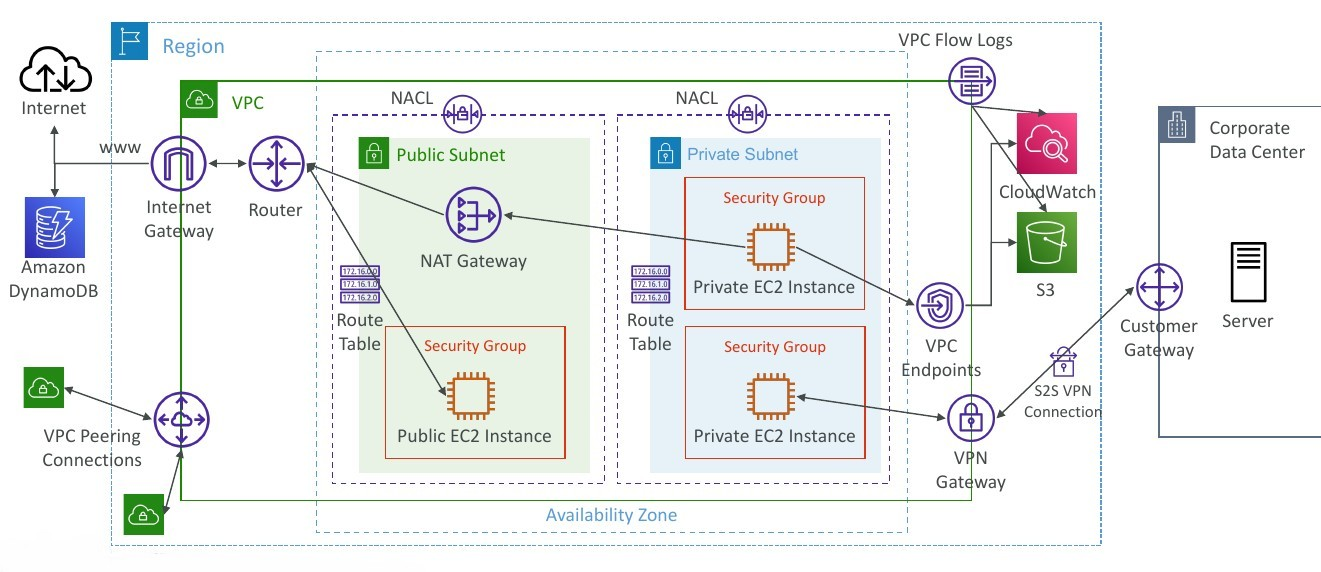
With Amazon Virtual Private Cloud (Amazon VPC), you can launch AWS resources in a logically isolated virtual network that you’ve defined. This virtual network closely resembles a traditional network that you’d operate in your own data center, with the benefits of using the scalable infrastructure of AWS.
Configuration
Regardless of the type of subnet, the internal IPv4 address range of the subnet is always private. AWS never announces these address blocks to the internet.
When you create a VPC, you must specify a range of IPv4 addresses for the VPC in the form of a Classless Inter-Domain Routing (CIDR) block; for example, 10.0.0.0/16. This is the primary CIDR block for your VPC.
Subnets created in a VPC can communicate with each other, this is default behaviour. The main route table facilitates this communication.
Reference: How Amazon VPC works
CIDR - IPv4
Classless
Inter-Domain Routing- a method for allocating IP addressesUsed in Security Groupsrules andAWS networkingin generalA CIDR consists of two components
Base IP
- Represents an IP contained in the range (XX.XX.XX.XX)
- Example: 10.0.0.0, 192.168.0.0, …
Subnet Mask
- Defines how many bits can change in the IP
- Example: /0, /24, /32
- Can take two forms:
- /8 ó 255.0.0.0
- /16 ó 255.255.0.0
- /24 ó 255.255.255.0
- /32 ó 255.255.255.255
Public vs. Private IP (IPv4)
The Internet Assigned Numbers Authority (IANA) established certain blocks of IPv4 addresses for the use of private (LAN) and public (Internet) addresses
Private IPcan only allow certain values:- 10.0.0.0 - 10.255.255.255 (10.0.0.0/8) <- in big networks
- 172.16.0.0 - 172.31.255.255 (172.16.0.0/12) <- AWS default VPC in that range
- 192.168.0.0 - 192.168.255.255 (192.168.0.0/16) <- e.g., home networks
All the rest of the IP addresses on the Internet are Public
VPC in AWS - IPv4
VPC = Virtual Private CloudYou can have multiple VPCs in an AWS region (max. 5 per region - soft limit)
- Max. CIDR per VPC is 5, for each CIDR:
- Min. size is /28 (16 IP addresses)
Max. size is /16 (65536 IP addresses)
Because VPC is private, only the Private IPv4 ranges are allowed:
- 10.0.0.0 - 10.255.255.255 (10.0.0.0/8)
- 172.16.0.0 - 172.31.255.255 (172.16.0.0/12)
- 192.168.0.0 - 192.168.255.255 (192.168.0.0/16)
Your VPC CIDR should NOT overlap with your other networks (e.g., corporate)
VPC - Subnet (IPv4)
- AWS reserves
5 IP addresses(first 4 & last 1) in each subnet - These 5 IP addresses are not available for use and can’t be assigned to anEC2 instance
- Example: if CIDR block 10.0.0.0/24, then reserved IP addresses are:
- 10.0.0.0 - Network Address
- 10.0.0.1 - reserved by AWS for the VPC router
- 10.0.0.2 - reserved by AWS for mapping to Amazon-provided DNS
- 10.0.0.3 - reserved by AWS for future use
- 10.0.0.255 - Network Broadcast Address. AWS does not support broadcast in a VPC, therefore the address is reserved
Exam Tip, if you need 29 IP addresses for EC2 instances:- You can’t choose a subnet of size /27 (32 IP addresses, 32 - 5 = 27 < 29)
- You need to choose a subnet of size /26 (64 IP addresses, 64 - 5 = 59 > 29)
Internet Gateway (IGW)
Allows resources (e.g., EC2 instances) in a VPC connect to the Internet
It scales horizontally and is highly available and redundant
Must be created separately from a VPC
One VPC can only be attached to one IGW and vice versa
Internet Gateways on their own do not allow Internet access…
Route tables must also be edited!
Bastion Hosts
Is an ec2 instance, it’s espcial because it’s in a public subnet, with its segurity group
- We can use a Bastion Host to SSH into our private EC2 instances
- The bastion is in the public subnet which is then connected to all other private subnets
Bastion Host security group must allowinbound from the internet on port 22 from restricted CIDR, for example the public CIDR of your corporationSecurity Group of the EC2 Instancesmust allow the Security Group of the Bastion Host, or the private IP of the Bastion host
NAT Instance (outdated, but still at the exam)
- NAT = Network Address Translation
- Allows EC2 instances in private subnets toconnect to the Internet
- Must be launched in a public subnet
- Must disable EC2 setting:
Source / destination Check - Must have Elastic IP attached to it
- Route Tables must be configured to route traffic from private subnets to the NAT instance
NAT Gateway
- AWS-managed NAT, higher bandwidth, high availability, no administration
- Pay per hour for usage and bandwidth
- NATGW is created in a specific Availability Zone, uses an Elastic IP
- Can’t be used by EC2 instance in the same subnet (only from other subnets)
- Requires an IGW (Private Subnet => NATGW => IGW)
- 5 Gbps of bandwidth with automatic scaling up to 45 Gbps
- No Security Groups to manage / required
NAT Gateway with High Availability
NAT Gateway is resilient within a single Availability Zone- Must create
multiple NAT Gatewaysinmultiple AZsfor fault-tolerance - There is no cross-AZ failover needed because if an AZ goes down it doesn’t need NAT
Connect the Lambda function to a private subnet that has a route to a NAT gateway deployed in a public subnet of the VPC.
Explanation: By connecting the Lambda function to a private subnet with a route to a NAT gateway, the function can access resources within the VPC while also leveraging the NAT gateway to access the internet and communicate with third-party APIs. The NAT gateway acts as a bridge between the private subnet and the internet, allowing the Lambda function to securely access external resources.
DNS Resolution in VPC
DNS Resolution (enableDnsSupport)- Decides if DNS resolution from Route 53 Resolver server is supported for the VPC
- True (default): it queries the Amazon Provider DNS Server at
169.254.169.253or the reserved IP address at the base of theVPC IPv4 network range plus two (.2).
enableDnsSupport - Indicates whether the DNS resolution is supported for the VPC. If this attribute is false, the Amazon-provided DNS server in the VPC that resolves public DNS hostnames to IP addresses is not enabled. If this attribute is true, queries to the Amazon provided DNS server at the 169.254.169.253 IP address, or the reserved IP address at the base of the VPC IPv4 network range plus two will succeed.
DNS Hostnames (enableDnsHostnames)- By default,
- True => default VPC
- False => newly created VPCs
- Won’t do anything unless enableDnsSupport=true
- If True, assigns public hostname to EC2 instance if it has a public IPv4
enableDnsHostnames - Indicates whether the instances launched in the VPC get public DNS hostnames. If this attribute is true, instances in the VPC get public DNS hostnames, but only if the enableDnsSupport attribute is also set to true.
By default, both attributes are set to true in a default VPC or a VPC created by the VPC wizard. By default, only the enableDnsSupport attribute is set to true in a VPC created on the Your VPCs page of the VPC console or using the AWS CLI, API, or an AWS SDK.
DNS Resolution in VPC
- If you use custom DNS domain names in a Private Hosted Zone in Route 53, you must set both these attributes (enableDnsSupport & enableDnsHostname) to true
Network Access Control List (NACL)
- NACL are like a firewall which control traffic from and to subnets
- One NACL per subnet, new subnets are assigned the Default NACL
- You define NACL Rules:
- Rules have a number (1-32766), higher precedence with a lower number
- First rule match will drive the decision
- Example: if you define #100 ALLOW 10.0.0.10/32 and #200 DENY 10.0.0.10/32, the IP address will be allowed because 100 has a higher precedence over 200
- The last rule is an asterisk (*) and denies a request in case of no rule match
- AWS recommends adding rules by increment of 100
- Newly created NACLs will deny everything
- NACL are a
great way of blocking a specific IP addressat the subnet level
Default NACL
Accepts everything inbound/outboundwith the subnets it’s associated with
Ephemeral Ports
- For any two endpoints to establish a connection, they must use ports
- Clients connect to a
defined port, and expect a response on anephemeral port - Different Operating Systems use different port ranges, examples:
- IANA & MS Windows 10 -> 49152 - 65535
- Many Linux Kernels -> 32768 - 60999
| Security Group | NACL |
|---|---|
| Operates at the instance level | Operates at the subnet level |
| Supports allow rules only | Supports allow rules and deny rules |
Stateful: return traffic is automatically allowed, regardless of any rules |
Stateless: return traffic must be explicitly allowed by rules (think of ephemeral ports) |
| All rules are evaluated before deciding whether to allow traffic | Rules are evaluated in order (lowest to highest) when deciding whether to allow traffic, first match wins |
| Applies to an EC2 instance when specified by someone | Automatically applies to all EC2 instances in the subnet that it’s associated with |
VPC - Reachability Analyzer
- A network diagnostics tool that troubleshoots network connectivity between two endpoints in your VPC(s)
- It builds a model of the network configuration, then checks the reachability based on these configurations (
it doesn’t send packets) - When the destination is
Reachable- it produces hop-by-hop details of the virtual network pathNot reachable- it identifies the blocking component(s) (e.g., configuration issues in SGs, NACLs, Route Tables, …)
- Use cases: troubleshoot connectivity issues, ensure network configuration is as intended, …
VPC Peering
Privately connect two VPCs using AWS’ network
Make them behave as if they were in the same network
Must not have overlapping CIDRs
VPC Peering connection is
NOT transitive(must be established for each VPC that need to communicate with one another)You must update route tables in each VPC’s subnets to ensure EC2 instances can communicate with each otherYou can create VPC Peering connection between VPCs in
different AWS accounts/regionsYou can reference a security group in a peered VPC (
works cross accounts - same region)
VPC Endpoint (AWS PrivateLink)
A VPC Endpoint allows you to connect your VPC directly to AWS services without the need for internet gateways, NAT gateways, or VPN connections. It enables private communication between your VPC and the AWS service without going over the internet.
- Most secure & scalable way to
expose a service to 1000s of VPC(own or other accounts) - Does `not require VPC peering, internet gateway, NAT, route tables… (magical..)
- Requires a
network load balancer(Service VPC) andENI(Customer VPC)or GWLB - If the NLB is in multiple AZ, and the ENIs in multiple AZ, the solution is fault tolerant!
To configure a VPC Endpoint for accessing AWS Systems Manager APIs, you can follow these steps:
- Create a VPC Endpoint for AWS Systems Manager in your Amazon VPC. This creates an elastic network interface with a private IP address within your VPC.
- Update the route tables in your VPC to route traffic destined for the AWS Systems Manager API endpoints to the VPC Endpoint. This ensures that traffic is directed through the VPC Endpoint instead of going over the internet.
- Verify that your on-premises instances and AWS managed instances are configured to use the appropriate VPC and route tables.
Types of Endpoints
Interface Endpoints (powered by PrivateLink)- Provisions an ENI (private IP address) as an entry point (must attach a Security Group)
- Supports most AWS services
- $ per hour + $ per GB of data processed
Gateway Endpoints- Provisions a gateway and must be used as
a target in a route table (does not use security groups) - Supports both S3 and DynamoDB
- Free
- Provisions a gateway and must be used as
Gateway or Interface Endpoint for S3?
Gateway is most likely going to be preferred all the time at the exam.- Cost: free for Gateway, $ for interface endpoint
- Interface Endpoint is preferred access is
requiredfromon premises(Site to Site VPN or Direct Connect), a different VPC or a different region.
VPC Flow Logs
- Capture information about IP traffic going into your interfaces:
- VPC Flow Logs
- Subnet Flow Logs
- Elastic Network Interface (ENI) Flow Logs
- Helps to monitor & troubleshoot connectivity issues
- Flow logs data can go to S3, CloudWatch Logs, and Kinesis Data Firehose
- Captures network information from AWS managed interfaces too: ELB, RDS, ElastiCache, Redshift, WorkSpaces, NATGW, Transit Gateway…
VPC Flow Logs Syntax
srcaddr & dstaddr- help identify problematic IPsrcport & dstport- help identity problematic portsAction- success or failure of the request due to Security Group / NACL- Can be used for analytics on usage patterns, or malicious behavior
Query VPC flow logs using Athena on S3 or CloudWatch Logs Insights- Flow Logs examples: https://docs.aws.amazon.com/vpc/latest/userguide/flow-logs-records-examples.html
AWS Site-to-Site VPN
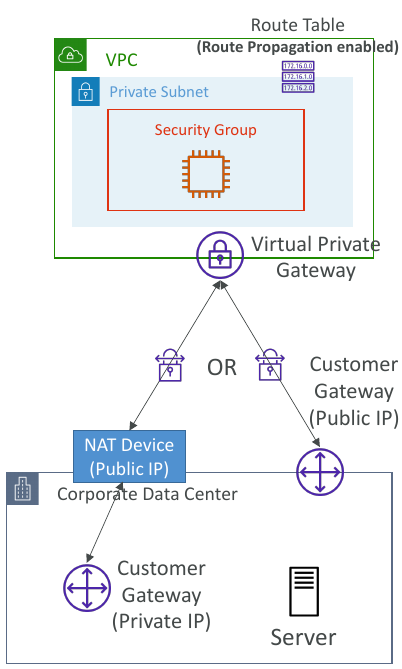
Virtual Private Gateway (VGW)- VPN concentrator on the AWS side of the VPN connection
- VGW is created and attached to the VPC from which you want to create the Site-to-Site VPN connection
- Possibility to customize the ASN (Autonomous System Number)
Customer Gateway (CGW)- Software application or physical device on customer side of the VPN connection
- https://docs.aws.amazon.com/vpn/latest/s2svpn/your-cgw.html#DevicesTested
Site-to-Site VPN Connections
Customer Gateway Device (On-premises)- 👀 What IP address to use?
- Public Internet-routable IP address for your Customer Gateway device
- If it’s behind a NAT device that’s enabled for NAT traversal (NAT-T), use the public IP address of the NAT device
- 👀 What IP address to use?
- 👀
Important step: enableRoute Propagationfor the Virtual Private Gateway in the route table that is associated with your subnets - 👀 If you need to
ping your EC2 instancesfrom on-premises, make sure you add theICMP protocol on the inbound of your security groups.
AWS VPN CloudHub
- Provide secure communication between multiple sites, if you have multiple VPN connections
Low-costhub-and-spoke model for primary or secondary network connectivity between different locations (VPN only)- It’s a VPN connection so it goes over the
public Internet - To set it up, connect multiple VPN connections on the same VGW, setup dynamic routing and configure route tables
To create a VPN
- Create Customer Gateway
- Create Virtual Private Gateway
- Use Site-to-Site VPN connection for both VGW and customers Gateway.
Direct Connect (DX)
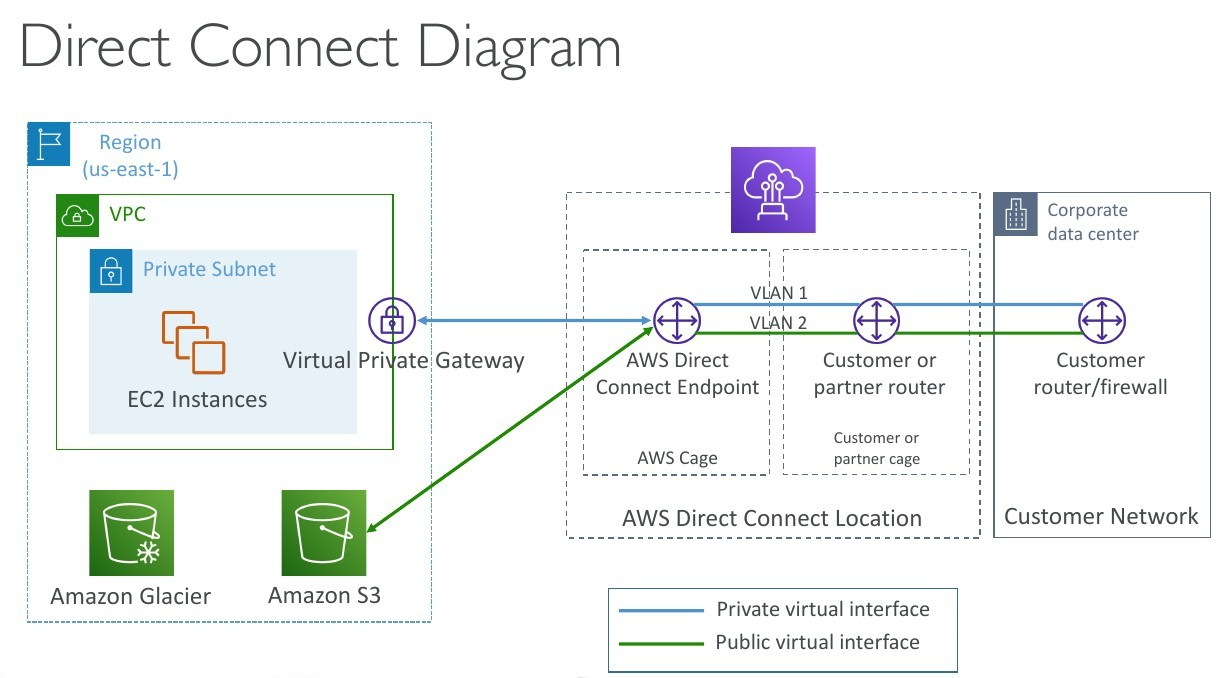
- Provides a dedicated
privateconnection from aremote network to your VPC. - Dedicated connection must be setup between your DC and AWS Direct Connect locations
- You
needto setup aVirtual Private Gatewayon your VPC - Access public resources (S3) and private (EC2) on same connection
- Use Cases:
- Increase bandwidth throughput - working with large data sets - lower cost
- More consistent network experience - applications using real-time data feeds
- Hybrid Environments (on prem + cloud)
- Supports both IPv4 and IPv6
Direct Connect Gateway
If you want to setup a Direct Connect to one or more VPC in many different regions (same account), you must use a Direct Connect Gateway. - Exam 👀
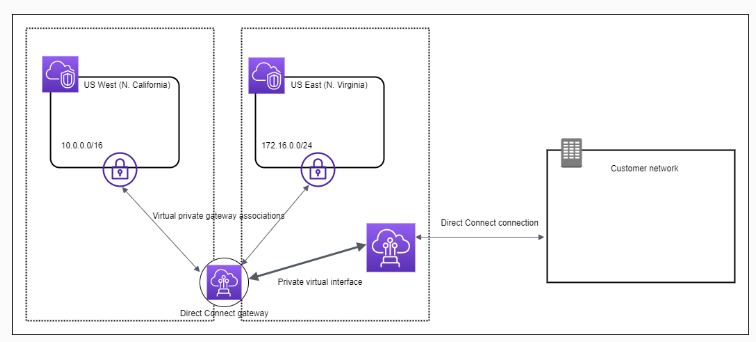
Direct Connect - Connection Types
Dedicated Connections: 1Gbps,10 Gbps and 100 Gbps capacity- Physical ethernet port dedicated to a customer
- Request made to AWS first, then completed by AWS Direct Connect Partners
Hosted Connections: 50Mbps, 500 Mbps, to 10 Gbps- Connection requests are made via AWS Direct Connect Partners
- Capacity can be
added or removed on demand - 1, 2, 5, 10 Gbps available at select AWS Direct Connect Partners
- Lead times are often longer than 1
month to establish a new connection- 👀 EXAM
Direct Connect - Encryption
- Data in transit is
not encryptedbut is private AWS Direct Connect + VPN providesan IPsec-encrypted private connection
Direct Connect - Resiliency
High Resiliency for Critical Workloads
Maximum Resiliency for Critical Workloads
Site-to-Site VPN connection as a backup
In case Direct Connect fails, you can set up a backup Direct Connect connection (expensive), or a Site-to-Site VPN connection.
Transit Gateway
For having transitive peering between thousands of VPC and on-premises, hub-and-spoke (star) connectionRegional resource, can work cross-region- Share cross-account using Resource Access Manager (RAM)
- You can peer Transit Gateways across regions
- Route Tables: limit which VPC can talk with other VPC
- Works with Direct Connect Gateway, VPN connections
- Supports
IP Multicast(not supported by any other AWS service)1
Transit Gateway: Site-to-Site VPN ECMP
ECMP = Equal-cost multi-path routing.- Routing strategy to allow to forward a packet over multiple best path.
- Use case: create multiple Site-to-Site VPN connections
to increase the bandwidth of your connection to AWS.
VPC - Traffic Mirroring
- Capture the traffic
- From (Source) - ENIs
- To (Targets) - an ENI or a Network Load Balancer
- Source and Target can be in the same VPC or different VPCs (VPC Peering)
- Use cases: content inspection, threat Auto Scaling group monitoring, troubleshooting, …
IPv6 in VPC
IPv4 cannot be disabled for your VPC and subnets- You
can enable IPv6(they’re public IP addresses) to operate indual-stack mode. - Your EC2 instances
- They can communicate using either IPv4 or IPv6 to the internet through an Internet Gatewaywill get at least a private internal IPv4 and a public IPv6
IPv6 Troubleshooting
IPv4 cannot be disabled for your VPC and subnets- So, if you cannot launch an EC2 instance in your subnet
- It’s not because it cannot acquire an IPv6 (the space is very large)
- It’s because there are no available IPv4 in your subnet
Solution: create a new IPv4 CIDR in your subnet
Egress-only Internet Gateway
An egress-only internet gateway is a horizontally scaled, redundant, and highly available VPC component that allows outbound communication over IPv6 from instances in your VPC to the internet, and prevents the internet from initiating an IPv6 connection with your instances. You must update the Route Tables
An egress-only internet gateway is for use with IPv6 traffic only. To enable outbound-only internet communication over IPv4, use a NAT gateway instead.
Reference: Enable outbound IPv6 traffic using an egress-only internet gateway
Carrier gateway
A Carrier gateway is a highly available virtual appliance that provides outbound IPv6 internet connectivity for instances in your VPC. It acts as a gateway between your VPC and the internet, allowing IPv6 traffic to flow in and out of your VPC. By configuring a Carrier gateway, you can enable outbound communication over IPv6 for the EC2 instances in the private subnets while keeping them isolated from direct internet access.
Security Groups
By default, security groupsallow all outbound traffic.- Security group
rules are always permissive; you can’t create rules that deny access. - Security groups are
stateful
The reason for the issue where the new EC2 instances are unable to mount the Amazon EFS file system in a new Availability Zone could be:
The security group for the mount target does not allow inbound NFS connections from the security group used by the EC2 instances.
Explanation: When mounting an Amazon EFS file system from EC2 instances, the security group associated with the mount target should allow inbound NFS (Network File System) connections from the security group used by the EC2 instances. By default, the security group associated with the mount target allows inbound connections from the default security group of the VPC. If the EC2 instances are using a different security group, it needs to be added to the mount target’s security group’s inbound rules to allow NFS connections.
👀 - Only support allow rules. You have to allow incoming traffic from your customers to your instances
The following provides an overview of the steps to enable your VPC and subnets to use IPv6:
Step 1: Associate an IPv6 CIDR Block with Your VPC and Subnets - Associate an Amazon-provided IPv6 CIDR block with your VPC and with your subnets.Step 2: Update Your Route Tables - Update your route tables to route your IPv6 traffic. For a public subnet, create a route that routes all IPv6 traffic from the subnet to the Internet gateway. For a private subnet, create a route that routes all Internet-bound IPv6 traffic from the subnet to an egress-only Internet gateway.Step 3: Update Your Security Group Rules - Update your security group rules to include rules for IPv6 addresses. This enables IPv6 traffic to flow to and from your instances. If you’ve created custom network ACL rules to control the flow of traffic to and from your subnet, you must include rules for IPv6 traffic.Step 4: Change Your Instance Type - If your instance type does not support IPv6, change the instance type. If your instance type does not support IPv6, you must resize the instance to a supported instance type. In the example, the instance is an m3.large instance type, which does not support IPv6. You must resize the instance to a supported instance type, for example, m4.large.Step 5: Assign IPv6 Addresses to Your Instances - Assign IPv6 addresses to your instances from the IPv6 address range of your subnet.Step 6: (Optional) Configure IPv6 on Your Instances - If your instance was launched from an AMI that is not configured to use DHCPv6, you must manually configure your instance to recognize an IPv6 address assigned to the instance.
VPC Section Summary
CIDR- IP RangeVPC- Virtual Private Cloud => we define a list of IPv4 & IPv6 CIDRSubnets- tied to an AZ, we define a CIDRInternet Gateway- at the VPC level, provide IPv4 & IPv6 Internet AccessRoute Tables- must be edited to add routes from subnets to the IGW, VPC Peering Connections, VPC Endpoints, …Bastion Host- public EC2 instance to SSH into, that has SSH connectivity to EC2 instances in private subnetsNAT Instances- gives Internet access to EC2 instances in private subnets. Old, must be setup in a public subnet, disable Source / Destination check flagNAT Gateway- managed by AWS, provides scalable Internet access to private EC2 instances, IPv4 onlyPrivate DNS+ Route 53 - enable DNS Resolution + DNS Hostnames (VPC) -NACL- stateless, subnet rules for inbound and outbound, don’t forget Ephemeral PortsSecurity Groups- stateful, operate at the EC2 instance levelReachability Analyzer- perform network connectivity testing between AWS resourcesVPC Peering- connect two VPCs with non overlapping CIDR, non-transitiveVPC Endpoints- provide private access to AWS Services (S3, DynamoDB, CloudFormation, SSM) within a VPCVPC Flow Logs- can be setup at the VPC / Subnet / ENI Level, for ACCEPT and REJECT traffic, helps identifying attacks, analyze using Athena or CloudWatch Logs InsightsSite-to-Site VPN- setup a Customer Gateway on DC, a Virtual Private Gateway on VPC, and site-to-site VPN over public InternetAWS VPN CloudHub- hub-and-spoke VPN model to connect your sitesDirect Connect- setup a Virtual Private Gateway on VPC, and establish a direct private connection to an AWS Direct Connect LocationDirect Connect Gateway- setup a Direct Connect to many VPCs in different AWS regionsAWS PrivateLink / VPC Endpoint Services:- Connect services privately from your service VPC to customers VPC
- Doesn’t need VPC Peering, public Internet, NAT Gateway, Route Tables
- Must be used with Network Load Balancer & ENI
ClassicLink- connect EC2-Classic EC2 instances privately to your VPCTransit Gateway- transitive peering connections for VPC, VPN & DXTraffic Mirroring- copy network traffic from ENIs for further analysisEgress-only Internet Gateway- like a NAT Gateway, but for IPv6
Networking Costs in AWS per GB
- Use Private IP instead of Public IP for good savings and better network performance
- Use same AZ for maximum savings (at the cost of high availability) - Exam 👀
S3 Data Transfer Pricing - Analysis for USA
S3 ingress: freeS3 to Internet: $0.09 per GBS3 Transfer Acceleration:- Faster transfer times (50 to 500% better)
- Additional cost on top of Data Transfer Pricing: +$0.04 to $0.08 per GB
S3 to CloudFront: $0.00 per GBCloudFront to Internet: $0.085 per GB (slightly cheaper than S3)- Caching capability (lower latency)
- Reduce costs associated with S3 Requests Pricing (7x cheaper with CloudFront)
S3 Cross Region Replication: $0.02 per GB
AWS Network Firewall - 👀 OJO QUESTION
Protect your entire Amazon VPC- Pass traffic through only from known AWS service domains or IP address endpoints, such as Amazon S3.
- Use custom
lists of known bad domains to limit the types of domain names that your applications can access. - Perform
deep packet inspectionDPI on traffic entering or leaving your VPC. - Use stateful protocol detection to filter protocols like HTTPS, independent of the port used.
- From Layer 3 to Layer 7 protection
- Any direction, you can inspect
VPCtoVPCtrafficOutboundto internetInboundfrom internetTo / from Direct Connect & Site-to-Site VPN
- Internally, the AWS Network Firewall uses the AWS Gateway Load Balancer 👀
- Rules can be centrally managed
cross-accountbyAWS Firewall Managerto apply to many VPCs
Network Firewall - Fine Grained Controls
Supports 1000s of rules
IP & port - example: 10,000s of IPs filtering
Protocol - example: block the SMB protocol for outbound communications
Stateful domain list rule groups: only allow outbound traffic to *.mycorp.com or third-party software repo
General pattern matching using regex
Traffic filtering: Allow, drop, or alert for the traffic that matches the rulesActive flow inspectionto protect against network threats with intrusion-prevention capabilities (like Gateway Load Balancer, but all managed by AWS)Send logs of rule matches to Amazon S3, CloudWatch Logs, Kinesis Data Firehose
CloudFormation
cfn-init
- AWS::CloudFormation::Init must be in the Metadata of a resource
- With the cfn-init script, it helps make complex EC2 configurations readable
- The EC2 instance will query the CloudFormation service to get init data
- Logs go to /var/log/cfn-init.log
(More readable compared with user data scripts)
1 | UserData: |
1 | Metadata: |
cfn-signal & wait conditions
We still don’t know how to tell CloudFormation that the EC2 instance got properly configured after a
cfn-initFor this, we can use the
cfn-signalscript!- We run cfn-signal right after cfn-init
- Tell CloudFormation service to keep on going or fail
We need to define
WaitCondition:- Block the template until it receives a signal from cfn-signal
- We attach a
CreationPolicy(also works on EC2, ASG)- The creation policy is
invoked onlywhen AWS CloudFormation creates the associated resource. Currently, the only AWS CloudFormation resources that support creation policies areAWS::AutoScaling::AutoScalingGroup, AWS::EC2::Instance, and AWS::CloudFormation::WaitCondition.
- The creation policy is
1 | # Start cfn-signal to the wait condition |
1 | SampleWaitCondition: |
CloudFormation StackSets
- Create, update, or delete stacks across multiple accounts and regions with a single operation
- Administrator account to create StackSets
- Trusted accounts to create, update, delete stack instances from StackSets
Use AWS CloudFormation StackSets for Multiple Accounts in an AWS Organization:
Use AWS CloudFormation StackSets to deploy a template to each account to create the new IAM roles.
Explanation: AWS CloudFormation StackSets allows you to deploy a CloudFormation template across multiple AWS accounts. By using StackSets, you can create and manage the same IAM roles in each account within the organization. This ensures consistent deployment of roles across accounts and simplifies the management process.
Reference: New: Use AWS CloudFormation StackSets for Multiple Accounts in an AWS Organization
QUESTION To lunch the last AMI.
Use the Parameters section in the template to specify the Systems Manager (SSM) Parameter, which contains the latest version of the Windows regional AMI ID.
1 | Parameters: |
UpdatePolicy attribute - 👀 EXAM
By adding the UpdatePolicy attribute in CloudFormation and enabling the WaitOnResourceSignals property, the Auto Scaling group update process will be handled more gracefully. This approach allows CloudFormation to monitor the health and success of each instance during the update process before moving on to the next instance.
Appending a health check at the end of the user data script allows the instance to signal CloudFormation that it has successfully completed its initialization. This helps ensure that the instance is fully operational before proceeding to the next instance in the Auto Scaling group update process.
1 | CreationPolicy: |
👀 DependsOn attribute
With the DependsOn attribute, you can specify that the creation of a specific resource follows another. When you add a DependsOn attribute to a resource, that resource is created only after the creation of the resource specified in the DependsOn attribute.
Set Tags consistently in AWS across all accounts
Use the CloudFormation Resource Tags property to apply tags to certain resource types upon creation.
1 | Resources: |
Output and Export
1 | Outputs: |
1 | Resources: |
No conditions in parameters
1 | Parameters: |
!GetAtt- The Fn::GetAtt intrinsic function returns the value of an attribute from a resource in the template. This example snippet returns a string containing the DNS name of the load balancer with the logical name myELB - YML : !GetAtt myELB.DNSName JSON : “Fn::GetAtt” : [ “myELB” , “DNSName” ]!Sub- The intrinsic function Fn::Sub substitutes variables in an input string with values that you specify. In your templates, you can use this function to construct commands or outputs that include values that aren’t available until you create or update a stack.!Ref- The intrinsic function Ref returns the value of the specified parameter or resource.!FindInMap- The intrinsic function Fn::FindInMap returns the value corresponding to keys in a two-level map that is declared in the Mappings section. For example, you can use this in the Mappings section that contains a single map, RegionMap, that associates AMIs with AWS regions.
AWS Backup
- Fully managed service
Centrally manage and automate backups across AWS services.- No need to create custom scripts and manual processes
- Supported services:
- Amazon
EC2 / Amazon EBS - Amazon
S3 - Amazon
RDS (all DBs engines) / Amazon Aurora / Amazon DynamoDB - Amazon
DocumentDB / Amazon Neptune - Amazon
EFS / Amazon FSx (Lustre & Windows File Server)
- Amazon
- AWS Storage Gateway (Volume Gateway)
- Supports cross-region backups
- Supports cross-account backups
- On-Demand and Scheduled backups
- Tag-based backup policies
- You create backup policies known as
Backup Plans- Backup frequency (every 12 hours, daily, weekly, monthly, cron expression)
- Backup window
- Transition to Cold Storage (Never, Days, Weeks, Months, Years)
- Retention Period (Always, Days, Weeks, Months, Year
👀 QUESTIONUESTION
AWS Backup is a fully managed and cost-effective backup service that simplifies and automates data backup across AWS services including Amazon EBS, Amazon EC2, Amazon RDS, Amazon Aurora, Amazon DynamoDB, Amazon EFS, and AWS Storage Gateway. In addition, AWS Backup leverages AWS Organizations to implement and maintain a central view of backup policy across resources in a multi-account AWS environment. Customers simply tag and associate their AWS resources with backup policies managed by AWS Backup for Cross-Region data replication.
👀 QUESTIONUESTION For the production account, a SysOps administrator must ensure that all data is backed up daily for all current and future Amazon EC2 instances and Amazon Elastic File System (Amazon EFS) file systems. Backups must be retained for 30 days
Create a backup plan in AWS Backup. Assign resources by resource ID, selecting all existing EC2 and EFS resources that are running in the account. Edit the backup plan daily to include any new resources. Schedule the backup plan to run every day with a lifecycle policy to expire backups after 30 days.
Explanation: AWS Backup provides a centralized and automated solution for backing up data. By creating a backup plan and assigning resources by resource ID, you can easily include all existing EC2 instances and EFS file systems in the backup process. Editing the backup plan daily ensures that any new resources are automatically included in the backups. By scheduling the backup plan to run every day and configuring a lifecycle policy to expire backups after 30 days, you meet the requirement of daily backups with a retention period of 30 days.
AWS Backup does not reboot EC2 instances - 👀 QUESTIONUESTION
AWS Backup does not reboot EC2 instances at any time. To maintain the file integrity of images created, you have to apply the reboot parameter when taking images.
To create a Lambda function that calls the CreateImage API with a reboot parameter and then schedule the function to run on a daily basis via Amazon EventBridge (Amazon CloudWatch Events).
AWS Backup Vault Lock
- Enforce a WORM (Write On1ce Read Many) state for all the backups that you store in your AWS Backup Vault
- Additional layer of defense to protect your backups against:
- Inadvertent or malicious delete operations
- Updates that shorten or alter retention periods
- Even the root user cannot delete backups when enabled
AWS Shared Responsibility Model
- AWS responsibility - Security
ofthe Cloud- Protecting infrastructure (hardware, software, facilities, and networking) that runs all the AWS services
- Managed services like S3, DynamoDB, RDS, etc.
- Customer responsibility - Security
inthe Cloud- For EC2 instance, customer is responsible for management of the guest OS (including security patches and updates), firewall & network configuration, IAM
- Encrypting application data
- Shared controls:
- Patch Management, Configuration Management, Awareness & Training
DDoS (Distributed Denial-of-service) Protection on AWS
AWS Shield Standard: protects against DDoS attack for your website and applications, for all customers at no additional costs.AWS Shield Advanced: 24/7 premium DDoS protection.AWS WAF: Filter specific requests based on rules.CloudFront and Route 53:- Availability protection using global edge network
- Combined with AWS Shield, provides attack mitigation at the edge
- Be ready to scale - leverage
AWS Auto Scaling.
AWS WAF - Web Application Firewall
Protects your web applications from common web exploits (Layer 7)
Layer 7 is HTTP(vs Layer 4 is TCP)Deploy on
Application Load Balancer, API Gateway, CloudFrontDefine Web ACL (Web Access Control List):
- Rules can include:
IP addresses, HTTP headers, HTTP body, or URI strings - Protects from common attack -
SQL injectionandCross-Site Scripting (XSS). - Size constraints,
geo-match (block countries) Rate-based rules(to count occurrences of events) -for DDoS protection
- Rules can include:
Penetration Testing on AWS Cloud
- AWS customers are welcome to carry out security assessments or penetration tests against their AWS infrastructure
without prior approval for 8 services:- Amazon EC2 instances, NAT Gateways, and Elastic Load Balancers
- Amazon RDS
- Amazon CloudFront
- Amazon Aurora
- Amazon API Gateways
- AWS Lambda and Lambda Edge functions
- Amazon Lightsail resources
- Amazon Elastic Beanstalk environments
Penetration Testing on your AWS Cloud
Prohibited Activities- DNS zone walking via Amazon Route 53 Hosted Zones
- Denial of Service (DoS), Distributed Denial of Service (DDoS), Simulated DoS, Simulated DDoS
- Port flooding
- Protocol flooding
- Request flooding (login request flooding, API request flooding)
Read more: https://aws.amazon.com/security/penetration-testing/
Amazon Inspector: Securiry Compliance for EC2 and Sofware deployed on AWS.
AWS Inspector - 👀 EXAM
- Amazon Inspector is
used for security compliance of instances and applications deployed on AWS. - Amazon Inspector
checksforunintended network accessibilityof your Amazon EC2 instances andvulnerabilitieson those EC2 instances. - Amazon Inspector also
integrateswithAWS Security Hubto provide aviewof yoursecurity posture across multiple AWS accounts.
Amazon Inspector is an automated security assessment service that helps you test the network accessibility of your Amazon EC2 instances and the security state of your applications running on the instances.
An Amazon Inspector assessment report can be generated for an assessment run once it has been successfully completed. An assessment report is a document that details what is tested in the assessment run, and the results of the assessment. The results of your assessment are formatted into a standard report, which can be generated to share results within your team for remediation actions, to enrich compliance audit data, or to store for future reference.
You can select from two types of report for your assessment, a findings report or a full report. The findings report contains an executive summary of the assessment, the instances targeted, the rules packages tested, the rules that generated findings, and detailed information about each of these rules along with the list of instances that failed the check. The full report contains all the information in the findings report and additionally provides the list of rules that were checked and passed on all instances in the assessment target.
👀 Amazon Inspector
Automated Security Assessments- For
EC2 instances- Leveraging the AWS System Manager (SSM) agent
- Analyze against unintended network accessibility
- Analyze the running OS against known vulnerabilities
- For Container Images push to
Amazon ECR- Assessment of Container Images as they are pushed Amazon ECR
- For
Lambda Functions- Identifies software vulnerabilities in function code and package ependencies
- Assessment of functions as they are deployed
-> Reporting & integration with AWS Security Hub
To provide a view of your security posture across multiple AWS accounts.
-> Send findings to Amazon Event Bridge
AWS Security Hub - TODO
Supports automated security checks aligned to the Center for Internet Security’s (CIS) AWS Foundations Benchmark version 1.4.0 requirements for Level 1 and 2 (CIS v1.4.0).
CIS AWS Foundations Benchmark - TODO
Serves as a set of security configuration best practices for AWS. These industry-accepted best practices provide you with clear, step-by-step implementation and assessment procedures. Ranging from operating systems to cloud services and network devices, the controls in this benchmark help you protect the specific systems that your organization uses.
https://docs.aws.amazon.com/securityhub/latest/userguide/cis-aws-foundations-benchmark.html https://aws.amazon.com/about-aws/whats-new/2022/11/security-hub-center-internet-securitys-cis-foundations-benchmark-version-1-4-0/
What does Amazon Inspector evaluate?
Only for EC2 instances, Container Images & Lambda functions-EXAM- Continuous scanning of the infrastructure, only when needed
- Package vulnerabilities (EC2, ECR & Lambda) - database of CVE
- Network reachability (EC2)
- A risk score is associated with all vulnerabilities for prioritization
Amazon Inspector discovers potential security issues by using security rules to analyze AWS resources. Amazon Inspector also integrates with AWS Security Hub to provide a view of your security posture across multiple AWS accounts.
Amazon GuardDuty - 👀 EXAM
Intelligent Threat discovery to protect your AWS Account.- Uses Machine Learning algorithms, anomaly detection, 3rd party data
- One click to enable (30 days trial), no need to install software
- Input data includes:
CloudTrail Events Logs- unusual API calls, unauthorized deploymentsCloudTrail Management Events- create VPC subnet, create trail, …CloudTrail S3 Data Events- get object, list objects, delete object, …
VPC Flow Logs- unusual internal traffic, unusual IP addressDNS Logs- compromised EC2 instances sending encoded data within DNS queriesOptional Feature- EKS Audit Logs, RDS & Aurora, EBS, Lambda, S3 Data Events…
- Can setup
EventBridge rulesto be notified in case of findings - EventBridge rules can target AWS Lambda or SNS
Can protect against CryptoCurrency attacks (has a dedicated “finding” for it)- 👀 EXAM
AWS Macie
- Amazon Macie is a fully managed data security and data privacy service that uses
machine learning and pattern matching to discover andprotect your sensitive data in AWS. - Macie helps identify and alert you to
sensitive data, such as personally identifiable information (PII). - Notify to Amazon EventBridge => Integrations
QUESTION AWS Trusted Advisor
Trusted Advisor provides real-time guidance to help users follow AWS best practices to provision their resources. Hight level account assessment.
E.g. AWS Trusted Advisor checks for service usage that is more than 80% of the service limit.
Check categories - 👀 EXAM
Cost optimizationPerformanceSecurityFault toleranceService limits
Trusted Advisor - Support Plans - Exam
7 CORES CHECKS for Basic & Developer Support plan
- S3 Bucket Permissions
- Security Groups - Specific Ports Unrestricted
- IAM Use (one IAM user minimum)
- MFA on Root Account
- EBS Public Snapshots
- RDS Public Snapshots
- Service Limits
FULL CHECKS
- Full Checks available on the 5 categories
- Ability to set CloudWatch alarms when reaching limits
Programmatic Access using AWS Support API- Exa,
AWS KMS (Key Management Service)
- Anytime you hear “encryption” for an AWS service, it’s most likely KMS
- AWS manages encryption keys for us
- Fully integrated with IAM for authorization
- Easy way to control access to your data
Able to audit KMS Key usage using CloudTrail- Exam- Seamlessly integrated into most AWS services (EBS, S3, RDS, SSM…)
- Never ever store your secrets in plaintext, especially in your code!
- KMS Key Encryption also available through API calls (SDK, CLI)
- Encrypted secrets can be stored in the code / environment variables
KMS Automatic Key Rotation
For Customer-managed CMK(not AWS managed CMK)- If enabled: automatic key rotation happens
every 1 year. - Previous key is kept active so you can decrypt old data
- New Key has the same CMK ID (only the backing key is changed)
KMS Manual Key Rotation
When you want to rotate key every 90 days, 180 days, etc...- New Key has a different CMK ID
- Keep the previous key active so you can decrypt old data
- Better to use aliases in this case (to hide the change of key for the application)
- Good solution to rotate CMK that are not eligible for automatic rotation (
like asymmetric CMK)
Changing The KMS Key For An Encrypted EBS Volume
- You
can’tchangethe encryptionkeys used by an EBS volume. Create an EBS snapshotand create a new EBS volume andspecify the new KMS key.
Sharing KMS Encrypted RDS DB Snapshots
You can share RDS DB snapshots encrypted with KMS CMK with other accounts, but must first share the KMS CMK with the target account using Key Policy.
KMS Key Deletion Considerations
- Schedule CMK for deletion with a waiting period of 7 to 30 days
- CMK’s status is “Pending deletion” during the waiting period
- During the CMK’s deletion waiting period:
- The CMK can’t be used for cryptographic operations (e.g., can’t decrypt KMS- encrypted objects in S3 - SSE-KMS)
- The key is not rotated even if planned
- You can cancel the key deletion during the waiting period
- Consider disabling your key instead of deleting it if you’re not sure!
👀
You can allow IAM users or roles in one AWS account to use a customer master key (CMK) in a different AWS account. You can add these permissions when you create the CMK or change the permissions for an existing CMK.
To permit the usage of a CMK to users and roles in another account, you must use two different types of policies:
- The key policy for the CMK must give the external account (or users and roles in the external account) permission to use the CMK. The key policy is in the account that owns the CMK.
- IAM policies in the external account must delegate the key policy permissions to its users and roles. These policies are set in the external account and give permissions to users and roles in that account.
CloudHSM - Dedicated Hardware (HSM = Hardware Security Module)
- KMS => AWS manages the
softwarefor encryption. - CloudHSM => AWS provisions encryption
hardware. CUSTOMER MANAGED CMK.- You manage your own encryption keys entirely (not AWS)
HSM device is tamper resistant, FIPS 140-2 Level 3 compliance.- Supports both
symmetricandasymmetricencryption (SSL/TLS keys) - No free tier available
- Must use the CloudHSM Client Software
- Redshift supports CloudHSM for database encryption and key management
Good option to use with SSE-C encryption.
CloudHSM - High Availability
- CloudHSM clusters are spread across Multi AZ (HA)
- Great for availability and durability
👀 AWS Artifact (Not really a service) - 👀 EXAM
is a service that provides on-demand access to AWS compliance reports and other relevant documents.
Artifact Reports- Allows you to download AWS security and compliance documents from third-party auditors, like AWS ISO certifications, Payment Card Industry (PCI), and System and Organization Control (SOC) reportsArtifact Agreements- Allows you to review, accept, and track the status of AWS agreements such as the Business Associate Addendum (BAA) or the Health Insurance Portability and Accountability Act (HIPAA) for an individual account or in your organization -
Can be used to support internal audit or compliance.
AWS Secrets Manager
- Newer service, meant for storing secrets
- Capability to
force rotation of secretsevery X days - Automate generation of secrets on rotation (uses Lambda)
Integration with Amazon RDS(MySQL, PostgreSQL, Aurora)- Secrets are encrypted using KMS
- Mostly meant for RDS integration
AWS Secrets Manager - Multi-Region Secrets
- Replicate Secrets across multiple AWS Regions
- Secrets Manager keeps read replicas in sync with the primary Secret
- Ability to promote a read replica Secret to a standalone Secret
- Use cases: multi-region apps, disaster recovery strategies, multi-region DB…
Secrets Manager - Monitoring
CloudTrail captures API calls to the Secrets Manager API
CloudTrail captures other related events that might have a security or compliance impact on your AWS account or might help you troubleshoot operational problems.
CloudTrail records these events as non-API service events:- RotationStarted event
- RotationSucceeded event
RotationFailed event- RotationAbandoned event - a manual change to a secret instead of automated rotation
- StartSecretVersionDelete event
- CancelSecretVersionDelete event
EndSecretVersionDelete event
Combine with CloudWatch Logs and CloudWatch alarms for automations.
SSM Parameter Store vs Secret Manager
- Secret Manager ($$$):
- Automatic rotation
- Lambda func is provided for RDS, Redshift, DocumentDB
- KMS enc is mandatory.
- Integration with CloudFormation
- SSM Parameter Store ($)
- Simple API
- No secret rotation
- KMS enc optional
- Integration with CloudFormation
- Pull screcte from SSM Parater Store
SSM - Patch Manager
- Patch Baseline
- Defines which patches should and shouldn’t be installed on your instances
- Ability to create custom Patch Baselines (specify approved/rejected patches)
- Patches can be auto-approved within days of their release
- By default, install only critical patches and patches related to security
- Patch Group
- Associate a set of instances with a specific Patch Baseline
Example: create Patch Groups for different environments (dev, test, prod)- Instances should be defined with the tag key
Patch Group. - An instance can only be in one Patch Group
- Patch Group can be registered with only one Patch Baseline
SSM - Patch Manager Patch Baselines
Pre-Defined Patch Baseline
- Managed by AWS for different Operating Systems (can’t be modified)
- AWS-RunPatchBaseline (SSM Document) - apply both operating system and application patches (Linux, macOS, Windows Server)
Custom Patch Baseline
- Create your own Patch Baseline and choose which patches to auto-approve
- Operating System, allowed patches, rejected patches, …
- Ability to specify custom and alternative patch repositories
A patch group is essentially an association of EC2 instances that share the same patching requirements. Within Patch Manager, a patch baseline is a set of rules that dictate which patches should be installed. By using separate patch baselines for each group, it provides granular control over the patching process
EBS
QUESTION
- Use
separateAmazon EBSvolumesfor theoperating systemandyour data, even though root volume persistence feature is available. - EBS snapshots
only capture data that has been written to your Amazon EBS volume, which might exclude any data that has been locally cached by your application or operating system. - By default,
dataon anon-root EBS volumeispreservedeven if the instance isshutdown or terminated. By default, when you attach a non-root EBS volume to an instance, itsDeleteOnTerminationattribute issettofalse. Therefore, the default is to preserve these volumes. After the instance terminates, you can take a snapshot of the preserved volume or attach it to another instance. You must delete a volume to avoid incurring further charges.
QUESTION. To set up a backup strategy for an Amazon Elastic Block Store (Amazon EBS) volume storing a custom database on an Amazon EC2 instance, the following action should be taken:
Create an Amazon Data Lifecycle Manager (Amazon DLM) policy to take a snapshot of the EBS volume on a recurring schedule.
Explanation: Amazon Data Lifecycle Manager (Amazon DLM) allows you to create automated snapshot lifecycle policies for your Amazon EBS volumes. By creating an Amazon DLM policy, you can define the desired backup schedule and retention period for the EBS volume. The policy will then automatically create snapshots according to the defined schedule. This ensures that regular backups are taken and can be used for data recovery if needed.
EBS volumes deleted with the TerminateInstances API call continue to show for some time on AWS Config console - 👀 EXAM
Terminated Amazon EC2 instances use the DeleteOnTermination attribute for each attached EBS volume to determine to delete the volume. Amazon EC2 deletes the Amazon EBS volume that has the DeleteOnTermination attribute set to true, but it does not publish the DeleteVolume API call. This is because AWS Config uses the DeleteVolume API call as a trigger with the rule, and the resource changes aren’t recorded for the EBS volume. The EBS volume still shows as compliant or noncompliant.
AWS Config performs a baseline every six hours to check for new configuration items with the ResourceDeleted status. The AWS Config rule then removes the deleted EBS volumes from the evaluation results.
Amazon EBS volumes deleted using the DeleteVolume API call invoke a DescribeVolumes API call on volume. The DescribeVolumes API call returns an InvalidVolume.NotFound error code and the Amazon EBS volume is removed from the list of resources in AWS Config
SSD-backed volumes (IOPS-intensive)
EBS Volume Types
EBS Volumes come in 6 types
gp2 / gp3(SSD):General purposeSSD volume that balances price and performance for a wide variety of workloads.io1 / io2(SSD):Highest-performanceSSD volume for mission-critical low-latency or high-throughput workloads.Only multi-attach 16 instances at a timest1(HDD):Low costHDD volume designed for frequently accessed, throughput intensive workloadssc1(HDD):Lowest costHDD volume designed for less frequently accessed workloads
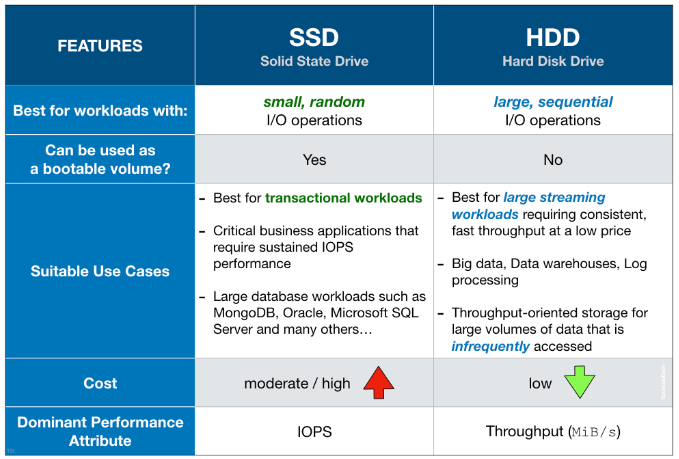
EBS Volumes are characterized in Size | Throughput | IOPS (I/O Ops Per Sec).
Only gp2/gp3 and io1/io2 can be used as boot volumes
EBS-optimizedinstanceuses an optimized configuration stack and provides additional, dedicated capacity for AmazonEBS I/O. This optimization provides the best performance for your EBS volumes by minimizing contention between Amazon EBS I/O and other traffic from your instance.
Provisioned IOPS SSD (io2 Block Express, io2 & io1) volumes
Provisioned IOPS SSD volumes are designed to deliver a maximum of 256,000 IOPS, 4,000 MB/s of throughput, and 64 TiB in size per volume1. io2 Block Express is the latest generation of the Provisioned IOPS SSD volumes that delivers 4x higher throughput, IOPS, and capacity than regular io2 volumes, along with sub-millisecond latency - at the same price as io2. io2 Block Express provides highest block storage performnce for the largest, most I/O- intensive, mission-critical deployments of Oracle, Microsoft SQL Server, SAP HANA, and SAS Analytics
General purpose SSD (gp3 and gp2) volumes
General-purpose volumes are backed by solid-state drives (SSDs) and are suitable for a broad range of transactional workloads, virtual desktops, medium sized single instance databases, latency sensitive interactive applications, dev/test environments, and boot volumes.
HDD-backed volumes (MB/s-intensive)
Throughput optimized HDD (st1) volumes
ST1 is backed by hard disk drives (HDDs) and is ideal for frequently accessed, throughput intensive workloads with large datasets and large I/O sizes, such as MapReduce, Kafka, log processing, data warehouse, and ETL workloads.
Cold HDD (sc1) volumes
SC1 is backed by hard disk drives (HDDs) and provides the lowest cost per GB of all EBS volume types. It is ideal for less frequently accessed workloads with large, cold datasets.
Changing the instance type
- The possibility to resize an instance depends on whether the root device is an EBS volume. If it is, you can easily change the instance size by modifying its instance type, also known as resizing. However, if the root device is an instance store volume, you need to migrate your application to a new instance with the desired instance type.
- Before changing the instance type of your Amazon EBS-backed instance, you must stop it. AWS will then move the instance to new hardware, but the instance ID will remain the same.
- If your instance belongs to an Auto Scaling group, the Amazon EC2 Auto Scaling service considers the stopped instance as unhealthy and may terminate it, launching a replacement instance instead. To avoid this, you can temporarily suspend the scaling processes for the group while resizing your instance.
Reference: Amazon EBS features
S3
QUESTION S3 inventory
Is one of the tools Amazon S3 provides to help manage your storage. You can use it to audit and report on the replication and encryption status of your objects for business, compliance, and regulatory needs.
You can also simplify and speed up business workflows and big data jobs using Amazon S3 inventory, which provides a scheduled alternative to the Amazon S3 synchronous List API operation.
Retain Until Date
A retention period safeguards an object version for a specified duration. When a retention period is assigned to an object version, Amazon S3 records a timestamp in the object version’s metadata, indicating when the retention period concludes. Once the retention period ends, the object version can be overwritten or deleted, unless a legal hold has also been placed on it.
You can assign a retention period to an object version either explicitly or through a default setting at the bucket level. Explicitly applying a retention period involves specifying a “Retain Until Date” for the object version. Amazon S3 stores this setting in the object version’s metadata and ensures the protection of the object version until the retention period expires.
References
- https://docs.aws.amazon.com/AmazonS3/latest/dev/object-lock.html
- https://docs.aws.amazon.com/AmazonS3/latest/dev/object-lock-overview.html
- https://docs.aws.amazon.com/AmazonS3/latest/dev/replication.html
S3 RTC S3 (Replication Time Control)
S3 Replication Time Control (S3 RTC) helps you meet compliance or business requirements for data replication and provides visibility into Amazon S3 replication times. S3 RTC replicates most objects that you upload to Amazon S3 in seconds, and 99.99 percent of those objects within 15 minutes. Amazon S3 events are available through Amazon SQS, Amazon SNS, or AWS Lambda.
Reference: Using S3 Replication Time Control
Amazon S3 Access Points
Allow you to create unique entry points for accessing your S3 buckets. Each access point can have its own access policy, allowing you to control access at a granular level. By using access points, you can assign specific permissions to each application or team accessing the shared bucket without affecting other applications. This helps in maintaining access control and minimizing the risk of unintended changes to the bucket policy.
Reference: Amazon S3 Access Points
Logs
S3 Server Access Logging
To track requests for access to your bucket, you can enable server access logging. Each access log record provides details about a single access request, such as the requester, bucket name, request time, request action, response status, and an error code, if relevant.
There is no extra charge for enabling server access logging on an Amazon S3 bucket, and you are not charged when the logs are PUT to your bucket. However, any log files that the system delivers to your bucket accrue the usual charges for storage. You can delete these log files at any time. Subsequent reads and other requests to these log files are charged normally, as for any other object, including data transfer charges.
By default, logging is disabled. When logging is enabled, logs are saved to a bucket in the same AWS Region as the source bucket.
Reference: Using Amazon S3 access logs to identify requests
As a Website
If you use an Amazon S3 bucket configured as a website endpoint, you must set it up with CloudFront as a custom origin. You can’t use the origin access identity feature. However, you can restrict access to content on a custom origin by setting up custom headers and configuring your origin to require them.
Enable MFA-Delete
You should note that only the bucket owner (root account) can enable MFA Delete only via the AWS CLI. However, the bucket owner, the AWS account that created the bucket (root account), and all authorized IAM users can enable versioning.
Vault Lock Policy
S3 Glacier Vault Lock allows you to easily deploy and enforce compliance controls for individual S3 Glacier vaults with a vault lock policy. You can specify controls such as “write once read many” (WORM) in a vault lock policy and lock the policy from future edits. Once locked, the policy can no longer be changed.
QUESTION Snowball Edge
AWS Snowball is a service designed for large-scale data transfers. Snowball Edge appliances are rugged, petabyte-scale data transfer devices that can be used for offline data migration. By using multiple instances of the AWS Snowball client and multiple Snowball Edge Appliances, the company can achieve fast and cost-effective data migration.
Using multiple instances of the AWS Snowball client and Snowball Edge Appliances allows for parallel data transfers, significantly reducing the migration time. It also avoids the need for network-based transfers, which could be slower and potentially costly due to data transfer charges.
Amazon S3 Storage Classes
Amazon S3 Standard-Infrequent Access (S3 Standard-IA)
S3 Standard-IA is for data that is accessed less frequently, but requires rapid access when needed. S3 Standard-IA offers the high durability, high throughput, and low latency of S3 Standard, with a low per GB storage price and per GB retrieval charge.
QUESTION Access to Amazon S3 via Direct Connect
It’s not possible to directly access an S3 bucket through a private virtual interface (VIF) using Direct Connect. This is true even if you have an Amazon Virtual Private Cloud (Amazon VPC) endpoint for Amazon S3 in your VPC because VPC endpoint connections can't extend outside of a VPC. Additionally, Amazon S3 resolves to public IP addresses, even if you enable a VPC endpoint for Amazon S3.
However, you can establish access to Amazon S3 using Direct Connect by following these steps (This configuration doesn’t require a VPC endpoint for Amazon S3, because traffic doesn’t traverse the VPC):
- Create a
connection. You can request adedicated connection or a hosted connection. - Establish a cross-network connection with the help of your network provider, and then create a public virtual interface for your connection.
- Configure an end router for use with the public virtual interface.
After the BGP is up and established, the Direct Connect router advertises all global public IP prefixes, including Amazon S3 prefixes. Traffic heading to Amazon S3 is routed through the Direct Connect public virtual interface through a private network connection between AWS and your data center or corporate network.
Amazon S3 - Security 👀
User-Based- IAM Policies - which API calls should be allowed for a specific user from IAM
Resource-Based- Bucket Policies - bucket wide rules from the S3 console -
allows cross account - Object Access Control List (ACL) - finer grain (can be disabled)
- Bucket Access Control List (ACL) - less common (can be disabled)
- Bucket Policies - bucket wide rules from the S3 console -
Note: an IAM principal can access an S3 object if- The user IAM permissions ALLOW it OR the resource policy ALLOWS it
- AND there’s no explicit DENY
Encryption: encrypt objects in Amazon S3 using encryption keys
S3 Bucket Policies 👀 EXAM
Use S3 bucket for policy to:
- Grant public access to the bucket
- Force objects to be encrypted at upload
Grant access to another account (Cross Account)
Optional Conditions on:
- Public IP or Elastic IP (not on Private IP)
- Source VPC or Source VPC Endpoint - only works with VPC Endpoints
- CloudFront Origin Identity
- MFA
Examples here: https://docs.aws.amazon.com/AmazonS3/latest/dev/example-bucket-policies.html
S3 Performance 👀 EXAM
Multi-Part upload:- recommended for files > 100MB, must use for files > 5GB
- Can help parallelize uploads (speed up transfers)
S3 Transfer Acceleration- Increase transfer speed by transferring file to an AWS edge location which will forward the data to the S3 bucket in the target region
- Compatible with multi-part upload
S3 Batch Operations
Eg Encrypt un-encrypted objects.
You can use S3 Inventory to get object list and use S3 Select to filter your objects.
S3 Inventory 👀 EXAM
- List objects and their corresponding metadata (alternative to S3 List API operation)
- Usage examples:
Audit and report on the replication and encryption status of your objectsGet the number of objects in an S3 bucketIdentify the total storage of previous object versions
- Generate daily or weekly reports
- Output files: CSV, ORC, or Apache Parquet
You can query all the data using Amazon Athena, Redshift, Presto, Hive, Spark...- You can filter generated report using S3 Select
- Use cases:
Business,Compliance,Regulatoryneeds, …
Amazon S3 Analytics - Storage Class Analysis 👀 EXAM
Help you
decide when to transition objects to the right storage classRecommendations for
StandardandStandard IADoes NOT work for One-Zone IA or Glacier
Report is updated daily
24 to 48 hours to start seeing data analysis
Good first step to put together Lifecycle Rules
Amazon S3 Glacier - Vault Policies & Vault Lock 👀 EXAM
- Each Vault has:
- ONE vault access policy
- ONE vault lock policy
- Vault Policies are written in JSON
- Vault Access Policy is like a bucket policy (restrict user / account permissions)
- Vault Lock Policy is a policy you lock, for regulatory and compliance requirements.
- The policy is immutable,
it can never be changed (that’s why it’s call LOCK) - Example 1: forbid deleting an archive if less than 1 year old
- Example 2: implement WORM policy (write once read many)
- The policy is immutable,
Glacier - Notifications for Restore Operations
S3 Event Notifications
- S3 supports the restoration of objects archivedto S3 Glacier storage classes
s3:ObjectRestore:Post=> notify when object restoration initiateds3:ObjectRestore:Completed=> notify whenobject restoration completed
Amazon S3 - Object Encryption
You can encrypt objects in S3 buckets using one of 4 methods
Server-Side Encryption (SSE)
Server-Side Encryption with Amazon S3-Managed Keys (SSE-S3)- Enabled by Default- Encrypts S3 objects using keys handled, managed, and owned by AWS
- Must set header
"x-amz-server-side-encryption": "AES256"
Server-Side Encryption with KMS Keys stored in AWS KMS (SSE-KMS)- Leverage AWS Key Management Service (AWS KMS) to manage encryption keys
- ust set header
"x-amz-server-side-encryption": "aws:kms"
Server-Side Encryption with Customer-Provided Keys (SSE-C)- When you want to manage your own encryption keys
HTTPS must be used
- Client-Side Encryption
Amazon S3 - Force Encryption in Transit aws:SecureTransport
CORS
Cross-origin resource sharing (CORS) defines a way for client web applications that are loaded in one domain to interact with resources in a different domain
Cross-Origin Resource Sharing (CORS)- Origin = scheme (protocol) + host (domain) + port
- example: https://www.example.com (implied port is 443 for HTTPS, 80 for HTTP)
- Web Browser based mechanism to allow requests to other origins while visiting the main origin
- Same origin: http://example.com/app1 & http://example.com/app2
- Different origins: http://www.example.com & http://other.example.com
- The requests won’t be fulfilled unless the other origin allows for the requests, using CORS Headers (example:
**Access-Control-Allow-Origin**)
👀 EXAM question
- If a client makes a cross-origin request on our S3 bucket, we need to enable the correct CORS headers. You can allow for a specific origin or for * (all origins)
Amazon S3 - MFA Delete
MFA (Multi-Factor Authentication) - force users to generate a code on a device (usually a mobile phone or hardware) before doing important operations on S3
MFA will be required to:
- Permanently delete an object version Google Authenticator
- Suspend Versioning on the bucket
MFA won’t be required to:
- Enable Versioning
- List deleted versions
To use MFA Delete,
Versioning must be enabledon the bucketOnly the bucket owner (root account) can enable/disable MFA Delete
Allow access if users are MFA authenticated
use an MFA condition in a policy to check the following properties:
Existence-To simply verify that the user did authenticate with MFA, check that the
aws:MultiFactorAuthPresentkey is True in a Bool condition. The key is only present when the user authenticates with short-term credentials. Long-term credentials, such as access keys, do not include this key.Duration-If you want to grant access only within a specified time after MFA authentication, use a numeric condition type to compare the aws:MultiFactorAuthAge key’s age to a value (such as 3600 seconds). Note that the
aws:MultiFactorAuthAgekey is not present if MFA was not used.
1 | "Condition": { |
S3 Access Logs
- For audit purpose, you may want to log all access to S3 buckets
- Any request made to S3, from any account, authorized or denied, will be logged into another S3 bucket
- That data can be analyzed using data analysis tools…
- The target logging bucket must be in the same AWS region
Amazon Athena
Serverless query service to analyze data stored in Amazon S3
Uses standard SQL language to query the files (built on Presto)
Supports CSV, JSON, ORC, Avro, and Parquet
Pricing: $5.00 per TB of data scanned
Commonly used with Amazon Quicksight for reporting/dashboards
Use cases: Business intelligence / analytics / reporting, analyze & query VPC Flow Logs, ELB Logs, CloudTrail trails, etc…Exam Tip: analyze data in S3 using serverless SQL, use Athena
Amazon Athena - Performance Improvement
Use columnardata for cost-savings (less scan).Compress datafor smaller retrievals (bzip2, gzip, lz4, snappy, zlip, zstd…).Partitiondatasets in S3 for easy querying on virtual columns.Use larger files(> 128 MB) to minimize overhead.
Amazon Athena - Federated Query
Allows you to run SQL queries across data stored in relational, non-relational, object, and custom data sources (AWS or on-premises)
Uses Data Source Connectors that run on AWS Lambda to run Federated Queries (e.g., CloudWatch Logs, DynamoDB, RDS, …)
Store the results back in Amazon S3
AWS OpsHub
AWS OpsHub for Snow Family, that you can use to manage your devices and local AWS services. You use AWS OpsHub on a client computer to perform tasks such as unlocking and configuring single or clustered devices, transferring files, and launching and managing instances running on Snow Family Devices. You can use AWS OpsHub to manage both the Storage Optimized and Compute Optimized device types and the Snow device. The AWS OpsHub application is available at no additional cost to you.
AWS OpsHub takes all the existing operations available in the Snowball API and presents them as a graphical user interface. This interface helps you quickly migrate data to the AWS Cloud and deploy edge computing applications on Snow Family Devices.
When your Snow device arrives at your site, you download, install, and launch the AWS OpsHub application on a client machine, such as a laptop. After installation, you can unlock the device and start managing it and using supported AWS services locally. AWS OpsHub provides a dashboard that summarizes key metrics such as storage capacity and active instances on your device. It also provides a selection of AWS services that are supported on the Snow Family Devices. Within minutes, you can begin transferring files to the device.
Amazon FSx - Overview
Launch 3rd party high-performance file systems on AWS
FSx for Lustre
Lustre is a type of parallel distributed file system, for large-scale computing. The name Lustre is derived from “Linux” and “cluster.
Machine Learning, High Performance Computing (HPC)- Video Processing, Financial Modeling, Electronic Design Automation
Seamless integration with S3- Can “read S3” as a file system (through FSx)
- Can write the output of the computations back to S3 (through FSx)
Can be used from on-premises servers (VPN or Direct Connect)
FSx Lustre - File System Deployment Options
Scratch File System: Temporary storagePersistent File System
- Long-term storage
- Data is replicated within same AZ
FSx for Windows File Server
FSx for Windowsis a fully managed Windows file system share drive- Supports SMB protocol & Windows NTFS
- Microsoft Active Directory integration, ACLs, user quotas
Can be mounted on Linux EC2 instances- Supports
Microsoft's Distributed File System (DFS)Namespaces (group files across multiple FS)
FSx for NetAppONTAP
- Managed NetApp ONTAP on AWS
- File System compatible with
NFS, SMB, iSCSI protocols Point-in-time instantaneous cloning (helpful for testing new workloads)
FSx for OpenZFS
- Managed OpenZFS file system on AWS
- File System compatible with
NFS(v3, v4, v4.1, v4.2) Point-in-time instantaneous cloning (helpful for testing new workloads)
AWS Storage Gateway
Bridge between on-premises data and cloud data
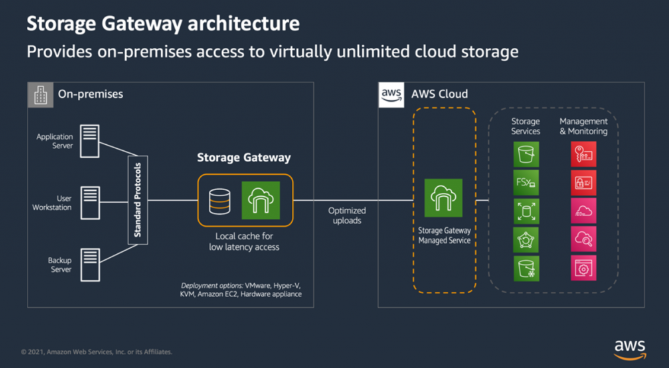
File Gateway is POSIX compliant (Linux file system)- POSIX metadata ownership, permissions, and timestamps stored in the object’s metadata in S3
Reboot Storage Gateway VM: (e.g., maintenance)
File Gateway: simply restart the Storage Gateway VMVolume and Tape Gateway:- Stop Storage Gateway Service (AWS Console, VM local Console, Storage Gateway API)
- Reboot the Storage Gateway VM
- Start Storage Gateway Service (AWS Console, VM local Console, Storage Gateway API)
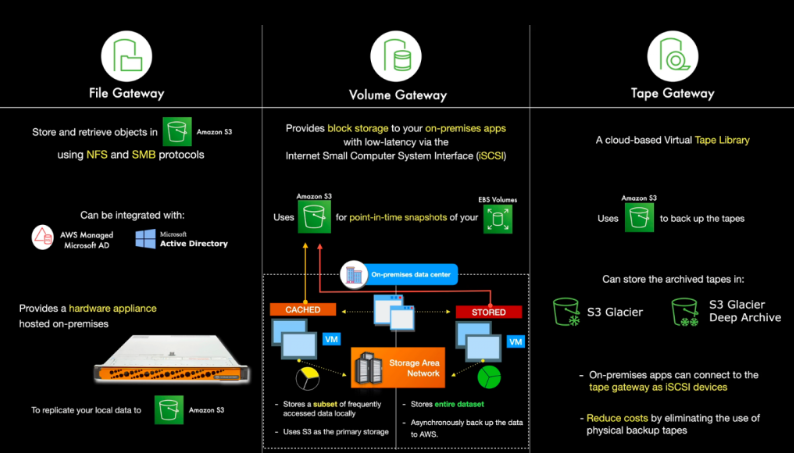
Types of Storage Gateway:
S3 File Gateway
- Configured S3 buckets are accessible using the
NFS and SMB protocol Most recently used data is cached in the file gateway- Supports S3 Standard, S3 Standard IA, S3 One Zone A, S3 Intelligent Tiering
- Transition to S3 Glacier using a Lifecycle Policy
FSx File Gateway
- Native access to Amazon FSx for Windows File Server
Local cache for frequently accessed dataWindows native compatibility (SMB, NTFS, Active Directory...)- Useful for group file shares and home directories
Volume Gateway
- Block storage using
iSCSI protocol backed by S3 Backed by EBS snapshotswhich can help restore on-premises volumes!Cached volumes: low latency access to most recent dataStored volumes: entire dataset is on premise, scheduled backups to S3
Tape Gateway
- Some companies have backup processes using physical tapes (!)
- With Tape Gateway, companies use the same processes but, in the cloud
Virtual Tape Library (VTL)backed by Amazon S3 and Glacier- Back up data using existing tape-based processes (and iSCSI interface)
- Works with leading backup software vendors
Storage Gateway - Activations
Two ways to get Activation Key:
- Using the Gateway VM CLI
- Make a web request to the Gateway VM (Port 80) old way
Troubleshooting Activation Failures - 👀 exam
- Make sure the Gateway VM has
port 80 opened - Check that the Gateway VM has the correct time and synchronizing its time automatically to a
Network Time Protocol (NTP)server
Amazon CloudFront
Content Delivery Network (CDN)
Improves read performance, content is cached at the edge- Improves users experience
- 216 Point of Presence globally (edge locations)
DDoS protection (because worldwide), integration with Shield, AWS Web Application Firewall
CloudFront - Origins
S3 bucket
- For distributing files and caching them at the edge
- Enhanced security with CloudFront
Origin Access Control (OAC) - OAC is replacing Origin Access Identity (OAI)
- CloudFront can be used as an ingress (to upload files to S3)
Custom Origin (HTTP)
- Application Load Balancer
- EC2 instance
- S3 website (must first enable the bucket as a static S3 website)
- Any HTTP backend you want
AwS Origin Shield - 👀 EXAM
Enabling the Origin Shield feature in CloudFront helps reduce the load on the origin server by adding an additional caching layer between CloudFront edge locations and `the origin. It improves cache hit ratios and reduces the number of requests hitting the origin by serving content from the Origin Shield cache.
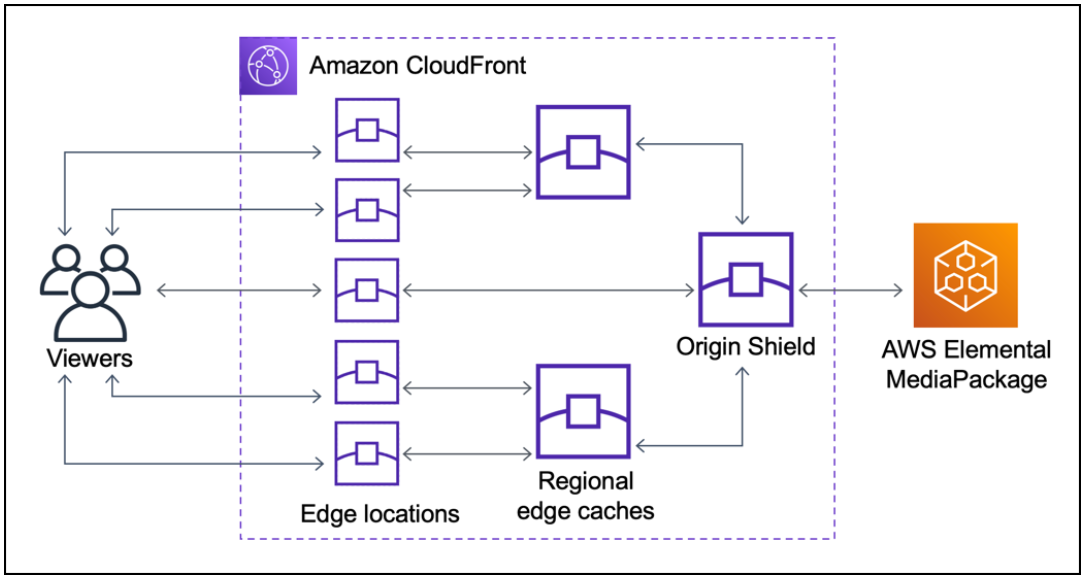
AWS WAF (Web Application Firewall)
AWS WAF is a web application firewall that lets you monitor the HTTP and HTTPS requests that are forwarded to an Amazon CloudFront distribution, an Amazon API Gateway REST API, an Application Load Balancer, or an AWS AppSync GraphQL API.
QUESTION Change AWS Firewall Manager administration account
You can designate only one account in an organization as a Firewall Manager administrator account. To create a new Firewall Manager administrator account, you must revoke the original administrator account first.
CloudFront Origin Headers vs Cache Behavior
Origin Custom Headers:
- Origin-level setting
- Set a constant header / header value for all requests to origin
Behavior setting:
- Cache-related settings
- Contains the whitelist of headers to forward
CloudFront Caching TTL
**“Cache-Control: max-age”** is preferred to “Expires” header
CloudFront - Increasing Cache Ratio
Monitor the CloudWatch metric CacheHitRate
- Specify how long to cache your objects:
Cache-Control max-ageheader - Specify none or the minimally required
headers - Specify none or the minimally required
cookies - Specify none or the minimally required
query string parameters - Separate static and dynamic distributions (two origins)
CloudFront with ALB sticky sessions - EXAM QUESTION
- Must forward / whitelist the cookie that controls the session affinity to the origin to allow the session affinity to work
- Set a TTL to a value lesser than when the authentication cookie expire
Cookie: AWSALB=...
AWS Health Dashboard - Service History
Shows all regions, all services health
Shows historical information for each day
Has an RSS feed you can subscribe to
Previously called AWS Service Health Dashboard
AWS Health Dashboard - Your Account
Previously called
AWS Personal Health Dashboard(PHD).AWS Account Health Dashboard provides
alerts and remediation guidancewhen AWS is experiencingevents that may impact you.While the Service Health Dashboard displays the general status of AWS services, Account Health Dashboard gives you a
personalized view into the performance and availability of the AWS services underlying your AWS resources.The dashboard displays
relevant and timely informationto help you manage events in progress andprovides proactivenotification to help you plan forscheduled activities.Can aggregate data from an entire AWS OrganizationGlobal service
Shows how AWS outages directly impact you & your AWS resources
Alert, remediation, proactive, scheduled activitie
Health Event NotificationsC
- Use
EventBridge to react to changes for AWS Health eventsin your AWS account - Example: receive email notifications when EC2 instances in your AWS account are scheduled for updates
- This is possible for Account events (resources that are affected in your account) and Public Events (Regional availability of a service)
- Use cases: send notifications, capture event information, take corrective action…
👀 QUESTION AWS Personal Health Dashboard
AWS Personal Health Dashboard provides alerts and remediation guidance when AWS is experiencing events that may impact you. While the Service Health Dashboard displays the general status of AWS services, Personal Health Dashboard gives you a personalized view into the performance and availability of the AWS services underlying your AWS resources.
What’s more, Personal Health Dashboard proactively notifies you when AWS experiences any events that may affect you, helping provide quick visibility and guidance to help you minimize the impact of events in progress, and plan for any scheduled changes, such as AWS hardware maintenance.
The AWS Health API provides programmatic access to the AWS Health information that appears in the AWS Personal Health Dashboard. You can use the API operations to get information about events that might affect your AWS services and resources.
AWS Organizations
If you have created an organization in AWS Organizations, you can also create a trail that will log all events for all AWS accounts in that organization. This is referred to as an organization trail.
Offers policy-based management for multiple AWS accounts. With Organizations, you can create groups of accounts, automate account creation, and apply and manage policies for those groups. Organizations enable you to centrally manage policies across multiple accounts without requiring custom scripts and manual processes. It allows you to create Service Control Policies (SCPs) that centrally control AWS service use across multiple AWS accounts.
- Global service.
- Allows to manage multiple AWS accounts.
- The main account is the
management account. - Other accounts are
member accounts. - Member accounts can only be part of one organization.
- Consolidated Billing across all accounts - single payment method.
- Pricing benefits from
aggregated usage(volume discount for EC2, S3…). Shared reserved instances and Savings Plans discounts across accounts.- API is available to automate AWS account creation.
Advantages
- Multi Account vs One Account Multi VPC.
- Use tagging standards for billing purposes.
- Enable CloudTrail on all accounts, send logs to central S3 account.
- Send CloudWatch Logs to central logging account.
- Establish Cross Account Roles for Admin purposes.
Security: Service Control Policies (SCP)
- IAM policies applied to OU or Accounts to restrict Users and Roles.
- They do not apply to the management account (full admin power).
- Must have an explicit allow (does not allow anything by default - like IAM).
AWS Organizations - Reserved Instances
- For billing purposes, the consolidated billing feature of AWS Organizations treats all the accounts in the organization as one account.
- This means that
all accountsin the organization can receive the hourly cost benefit of Reserved Instances that are purchasedby any other account. The payer account (master account) of an organizationcan turn off Reserved Instance (RI) discount and Savings Plans discount sharing for any accounts in that organization, including the payer account- This means that RIs and Savings Plans discounts aren’t shared between any accounts that have sharing turned off.
- To share an RI or Savings Plans discount with an account,
both accounts must have sharing turned on.
AWS Organizations - IAM Policies
Use aws:PrincipalOrgID condition key in your resource-based policies to restrict access to IAM principals from accounts in an AWS Organization``
1 | { |
AWS Organizations - Tag Policies
- Helps you standardize tags across resources in an AWS Organization
- Ensure consistent tags, audit tagged resources, maintain proper resources categorization, …
- You define tag keys and their allowed values
- Helps with AWS Cost Allocation Tags and Attribute-based Access Control
- Prevent any non-compliant tagging operations on specified services and resources (has no effect on resources without tags)
- Generate a report that lists all tagged/non-compliant resources
- Use CloudWatch Events to monitor non-compliant tags
AWS Control Tower - <- AWS Organizations - 👀 EXAM
Offers the easiest way to `set up` and `govern` a `secure, multi-account AWS environment`.
Offers the easiest way to set up and govern a secure, multi-account AWS environment. It establishes a landing zone that is based on the best-practices blueprints and enables governance using guardrails you can choose from a pre-packaged list. The landing zone is a well-architected, multi-account baseline that follows AWS best practices. Guardrails implement governance rules for security, compliance, and operations.
- Benefits:
- Automate the set up of your environment in a few clicks
- Automate ongoing policy management using guardrails
- Detect policy violations and remediate them
- Monitor compliance through an interactive dashboard
AWS Control Tower runs on top of AWS Organizations:- It automatically sets up AWS Organizations to organize accounts and implement SCPs (Service Control Policies)
AWS Control Tower provides three methods for creating member accounts:
- Through the
Account Factory consolethat is part ofAWS Service Catalog. - Through the
Enroll account featurewithin AWSControl Tower. - From your AWS
Control Tower landing zone’s management account, usingLambdacode andappropriate IAM roles.
AWS Control Tower
It establishes a landing zone that is based on the best-practices blueprints and enables governance using guardrails you can choose from a pre-packaged list. The landing zone is a well-architected, multi-account baseline that follows AWS best practices. Guardrails implement governance rules for security, compliance, and operations.
👀 AWS Service Catalog
AWS Service Catalog allows organizations to create and manage catalogs of IT services that are approved for use on AWS. These IT services can include everything from virtual machine images, servers, software, and databases to complete multi-tier application architectures. AWS Service Catalog allows you to centrally manage deployed IT services and your applications, resources, and metadata. This helps you achieve consistent governance and meet your compliance requirements while enabling users to quickly deploy only the approved IT services they need.
Sharing and Importing Portfolios - 👀 EXAM
To make your Service Catalog products available to users who are not in your AWS accounts, such as users who belong to other organizations or to other AWS accounts in your organization, you share your portfolios with them. You can share in several ways, including account-to-account sharing, organizational sharing, and deploying catalogs using stack sets.
Before you share your products and portfolios to other accounts, you must decide whether you want to share a reference of the catalog or to deploy a copy of the catalog into each recipient account. Note that if you deploy a copy, you must redeploy if there are updates you want to propagate to the recipient accounts.
- Users that are new to AWS have too many options, and may create stacks that are not compliant / in line with the rest of the organization
- Some users just want a quick
self-service portalto launch a set ofauthorized productspre-definedby admins - Includes: virtual machines, databases, storage options, etc…
AWS Service Catalog - Sharing Catalogs
Share portfolios with individual AWS accounts or AWS Organizations.
AWS Service Catalog - TagOptions Library - EXAM
- Easily manage tags on provisioned products
TagOption:- Key-value pair managed in AWS Service Catalog
- Used to create an AWS Tag
- Can be associated with Portfolios and Products.
- Use cases:
proper resources tagging,defined allowedtags, … - Can be shared with other AWS accounts and AWS Organizations.
- A consistent
taxonomy- 👀 EXAM
Cost Explorer - 👀 EXAM - OJO
- Visualize, understand, and manage your AWS costs and usage over time
- Create custom reports that analyze cost and usage data.
- Analyze your data at a high level: total costs and usage across all accounts
- Or Monthly, hourly, resource level granularity
- Choose an optimal
Savings Plan(to lower prices on your bill) Forecast usage up to 12 months based on previous usage
👀 Collect information about the service costs of each developer
The AWS-generated tag
createdBydefines and applies to supported AWS resources for cost allocation purposes. To use the AWS-generated tags, a management account owner must activate it in the Billing and Cost Management console. When a management account owner activates the tag, it is also activated for all member accounts.Cost Exploreris a tool that enables you to view andanalyze your costs and usage. You can explore your usage and costs using the main graph, the Cost Explorer cost and usage reports, or the Cost Explorer RI reports.AWS Cost Explorer provides the following prebuilt reports:
- EC2
RI Utilization %offers relevant data to identify and act on opportunities to increase your Reserved Instance usage efficiency. It’s calculated by dividing Reserved Instance used hours by total Reserved Instance purchased hours. - EC2
RI Coverage %shows how much of your overall instance usage is covered by Reserved Instances. This lets you make informed decisions about when to purchase or modify a Reserved Instance to ensure
- EC2
AWS Budgets
Create budget and send alarms when costs exceeds the budget.- 4 types of budgets:
Usage, Cost, Reservation, Savings Plans.- Usage e.g. to create a cost budget exclusively for
data transfer expenses
- Usage e.g. to create a cost budget exclusively for
- For Reserved Instances (RI)
- Track utilization
- Supports
EC2, ElastiCache, RDS, Redshift
- Up to 5 SNS notifications per budget
- Can filter by: Service, Linked Account, Tag, Purchase Option, Instance Type, Region, Availability Zone, API Operation, etc…
Same options as AWS Cost Explorer!- 2 budgets are free, then $0.02/day/budget
Cost Allocation Tags - EXAM
- Use
cost allocation tagsto track your AWS costs on a detailed level AWS generated tags- Automatically applied to the resource you create
- Starts with Prefix
aws: (e.g. aws: createdBy)
User-defined tags- Defined by the user
- Starts with Prefix
user:
Cost and Usage Reports - EXAM
- Dive deeper into your AWS costs and usage
- The AWS Cost & Usage Report contains
the most comprehensive set of AWS cost and usage data available - Includes additional metadata about AWS services, pricing, and reservations (
e.g., Amazon EC2 Reserved Instances (RIs)) - The AWS Cost & Usage Report lists AWS usage for each:
- service category used by an account
- in hourly or daily line items
- any tags that you have activated for cost allocation purposes
Can be configured for daily exports to S3- Can be integrated with Athena, Redshift or QuickSight
AWS Compute Optimizer - 👀 EXAM OJO - 👀
Reduce costs and improve performance byrecommending optimal AWS resources for your workloadsHelps you choose optimal configurations and right-size your workloads (over/under provisioned)- 👀 EXAM- Uses Machine Learning to analyze your
resources configurations and their utilization CloudWatch metrics - Supported resources
EC2 instances- EC2
Auto Scaling Groups EBSvolumesLambdafunctions
- Lower your costs by up to 25%
- Recommendations can be exported to S3
IAM
If an IAM user, with full access to IAM and Amazon S3, assigns a bucket policy to an Amazon S3 bucket and doesn’t specify the AWS account root user as a principal, the root user is denied access to that bucket.
To fix this issue, the CTO needs to ensure that an IAM user with full access to both IAM and Amazon S3 explicitly includes the AWS account root user as a principal in the bucket policy of the S3 bucket. By adding the root user as a principal, access will be granted to the CTO and they will be able to access the S3 bucket in their AWS account.
Reference:
https://docs.aws.amazon.com/IAM/latest/UserGuide/troubleshoot_iam-s3.html
IAM Security Tools
IAM Credentials Report (account-level)- a report that lists all your account’s users and the status of their various credentials
IAM Access Advisor (user-level)- QUESTION- Access advisor shows the service permissions granted to a user and when those services were last accessed.
- You can use this in1formation to revise your policies.
IAM Access Analyzer - 👀 EXAM
helps you identify the resources in your organization and accounts, such as Amazon S3 buckets or IAM roles, shared with an external entity. This lets you identify unintended access to your resources and data, which is a security risk. Access Analyzer identifies resources shared with external principals by using logic-based reasoning to analyze the resource-based policies in your AWS environment. For each instance of a resource shared outside of your account, Access Analyzer generates a finding.
Find out which resources are shared externally- 👀 EXAM- S3 Buckets
- IAM Roles
- KMS Keys
- Lambda Functions and Layers
- SQS queues
- Secrets Manager Secrets
- Define
Zone of Trust= AWS Account or AWS Organization - Access outside zone of trusts => findings
IAM Policy Types
You manage access in AWS by creating policies and attaching them to IAM identities (users, groups of users, or roles) or AWS resources. A policy is an object in AWS that, when associated with an identity or resource, defines their permissions. Resource-based policies are JSON policy documents that you attach to a resource such as an Amazon S3 bucket. These policies grant the specified principal permission to perform specific actions on that resource and define under what conditions this applies.
Identity-basedpolicies are attached to an IAM user, group, or role. These policies let you specify what that identity can do (its permissions).Resource-basedpolicies are attached to a resource. For example, you can attach resource-based policies to Amazon S3 buckets, Amazon SQS queues, and AWS Key Management Service encryption keys.Identity-basedpolicies andresource-basedpolicies are both permissions policies and are evaluated together. For a request to which only permissions policies apply, AWS first checks all policies for a Deny. If one exists, then the request is denied. Then AWS checks for each Allow. If at least one policy statement allows the action in the request, the request is allowed. It doesn’t matter whether the Allow is in the identity-based policy or the resource-based policy.
References: Identity-based policies and resource-based policies - 👀 EXAM
Trust policy
Defines which principal entities (accounts, users, roles, and federated users) can assume the role. An IAM role is both an identity and a resource that supports resource-based policies. For this reason, you must attach both a trust policy and an identity-based policy to an IAM role. The IAM service supports only one type of resource-based policy called a role trust policy, which is attached to an IAM role.
References: Identity-based policies and resource-based policies
Identity Federation
- Federation
lets users outside of AWS to assume temporary role for accessing AWS resources. - These users assume identity provided access role.
Federation assumes a form of 3rd party authentication- LDAP
- Microsoft Active Directory (~= SAML) - 👀 EXAM
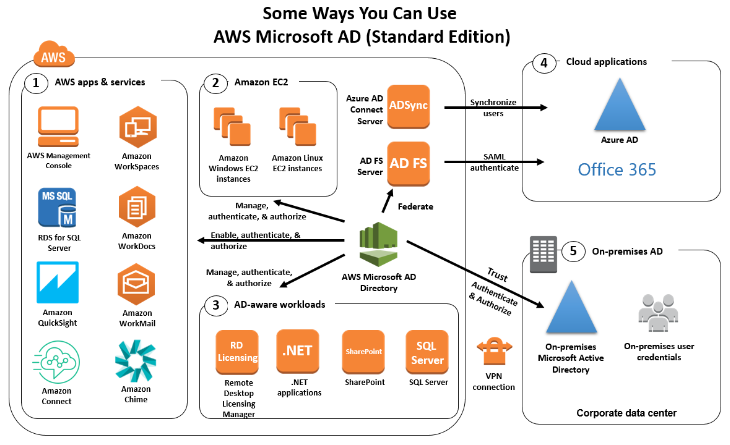
- Single Sign On - 👀 EXAM
- Open ID
- Cognito - 👀 EXAM
Using federation, you don’t need to create IAM users (user management is outside of AWS).
Custom Identity Broker Application
For Enterprises
- Use only if identity provider is
not compatible with SAML 2.0. The identity broker must determine the appropriate IAM policy.
AWS DataSync
Move large amount of datato and fromOn-premises/ other cloud to AWS (NFS, SMB, HDFS, S3 API…) - needs agentAWS to AWS(different storage services) - no agent needed
- Can synchronize to:
- Amazon S3 (any storage classes - including Glacier)
- Amazon EFS
- Amazon FSx (Windows, Lustre, NetApp, OpenZFS…)
- Replication
tasks can be scheduled hourly, daily, weekly. File permissions and metadata are preserved (NFS POSIX, SMB...). - Exam- One agent task can use 10 Gbps, can setup a bandwidth limit
Maybe for large quantity of data you can use AWS Snowcone with has the DataSync agent pre-installed.
AWS STS - Security Token Service
Allows to grant limited and temporary access to AWS resources.- Token is valid for up to one hour (must be refreshed)
AssumeRole- Within your own account: for enhanced security
- Cross Account Access: assume role in target account to perform actions there
AssumeRoleWithSAML- return credentials for users logged with SAML
AssumeRoleWithWebIdentity- return creds for users logged with an IdP (Facebook Login, Google Login, OIDC compatible…)
- AWS recommends against using this, and using
Cognitoinstead
GetSessionToken- for MFA, from a user or AWS account root user
Cognito Identity Pools - IAM Roles
Default IAM roles for authenticated and guest users
Define rules to choose the role for each user based on the user’s ID
You can partition your users’ access using
policy variables.IAM credentials are obtained by Cognito Identity Pools through STS
The roles must have a “trust” policy of Cognito Identity Pools
Cognito User Pools vs Identity Pools
Cognito User Pools (for authentication = identity verification):- Database of users for your web and mobile application
- Allows to federate logins through Public Social, OIDC, SAML…
- Can customize the hosted UI for authentication (including the logo)]
- Has triggers with AWS Lambda during the authentication flow
- Adapt the sign-in experience to different risk levels (MFA, etc…)
Cognito Identity Pools (for authorization = access control):- Obtain AWS credentials for your users
- Users can login through Public Social, OIDC, SAML & Cognito User Pools
- Users can be unauthenticated (guests)
- Users are mapped to IAM roles & policies, can leverage policy variables
CUP + CIP = manage user / password + access AWS services
Amazon Route 53
- A highly available, scalable, fully managed and Authoritative DNS
- Authoritative = the customer (you) can update the DNS records
- Route 53 is also a Domain Registrar
- Ability to check the health of your resources
- The only AWS service which provides 100% availability SLA
- Why Route 53? 53 is a reference to the traditional DNS port
Route 53 - Records
- How you want to route traffic for a domain
- Each record contains:
Domain/subdomain Name- e.g., example.comRecord Type- e.g., A or AAAAValue- e.g., 12.34.56.78Routing Policy- how Route 53 responds to queriesTTL- amount of time the record cached at DNS Resolvers
- Route 53 supports the following DNS record types:
- (must know) A / AAAA / CNAME / NS
- (advanced) CAA / DS / MX / NAPTR / PTR / SOA / TXT / SPF / SRV
Route 53 - Record Types
A- maps a hostname to IPv4AAAA- maps a hostname to IPv6CNAME- maps a hostname to another hostname- The target is a domain name which must have an A or AAAA record
- Can’t create a CNAME record for the top node of a DNS namespace (Zone Apex)
- Example: you can’t create for example.com, but you can create for www.example.com
NS- Name Servers for the Hosted Zone- Control how traffic is routed for a domain
Route 53 - Hosted Zones
- A container for records that define how to route traffic to a domain and its subdomains
Public Hosted Zones- contains records that specify how to route traffic on the Internet (public domain names) application1.mypublicdomain.comPrivate Hosted Zones- contain records that specify how you route traffic within one or more VPCs (private domain names) application1.company.internal- You pay $0.50 per month per hosted zone
Route 53 - Records TTL (Time To Live)
High TTL - e.g., 24 hr- Less traffic on Route 53
- Possibly outdated records
Low TTL - e.g., 60 sec.- More traffic on Route 53 ($$)
- Records are outdated for less time
- Easy to change records
Except for Alias records, TTL is mandatory for each DNS record
CNAME vs Alias
AWS Resources (Load Balancer, CloudFront…) expose an AWS hostname:
- lb1-1234.us-east-2.elb.amazonaws.com and you want myapp.mydomain.com
CNAME:
- Points a hostname to any other hostname. (app.mydomain.com => blabla.anything.com)
- ONLY FOR NON ROOT DOMAIN (aka. something.mydomain.com)
Alias:
- Points a hostname to an AWS Resource (app.mydomain.com => blabla.amazonaws.com)
- Works for ROOT DOMAIN and NON ROOT DOMAIN (aka mydomain.com)
- Free of charge.
- Native health check.
Route 53 - Alias Records
- Maps a hostname to an AWS resource
- An extension to DNS functionality
- Automatically recognizes changes in the resource’s IP addresses
- Unlike CNAME, it can be used for the top node of a DNS namespace (Zone Apex), e.g.: example.com
- Alias Record is always of type A/AAAA for AWS resources (IPv4 / IPv6)
You can’t set the TTL
Route 53 - Alias Records Targets
You cannot set an ALIAS record for an EC2 DNS name - 👀 EXAM
Route 53 - Routing Policies
- Define how Route 53 responds to DNS queries
- Don’t get confused by the word “Routing”
- It’s not the same as Load balancer routing which routes the traffic
- DNS does not route any traffic, it only responds to the DNS queries
- Route 53 Supports the following Routing Policies
- Simple
- Weighted
- Failover
- Latency based
- Geolocation
- Multi-Value Answer
- Geoproximity (using Route 53 Traffic Flow feature)
Types of health checks - 👀 EXAM
Health checks that monitor an endpoint- You can configure a health check that monitors an endpoint that you specify either by IP address or by domain name. At regular intervals that you specify, Route 53 submits automated requests over the internet to your application, server, or other resources to verify that it’s reachable, available, and functional. Optionally, you can configure the health check to make requests similar to those that your users make, such as requesting a web page from a specific URL.Health checks that monitor other health checks(calculated health checks) - You can create a health check that monitors whether Route 53 considers other health checks healthy or unhealthy. One situation where this might be useful is when you have multiple resources that perform the same function, such as multiple web servers, and your chief concern is whether some minimum number of your resources are healthy. You can create a health check for each resource without configuring notifications for those health checks. Then you can create a health check that monitors the status of the other health checks, and that notifies you only when the number of available web resources drops below a specified threshold.Health checks that monitor CloudWatch alarms- You can create CloudWatch alarms that monitor the status of CloudWatch metrics, such as the number of throttled read events for an Amazon DynamoDB database or the number of Elastic Load Balancing hosts that are considered healthy. After you create an alarm, you can create a health check that monitors the same data stream that CloudWatch monitors for the alarm.
“Evaluate Target Health” - 👀 EXAM
You need to set the Evaluate Target Health flag to true on Route 53. This way, Route 53 will check both ALB entry to ensure that your ALBs are responding.
Routing Policies - Weighted
- Control the % of the requests that go to each specific resource
- Assign each record a relative weight:
- traffic (%) = weight for a specific record /sum of all weight records
- Weights don’t need to sum up to 100
- DNS records must have the same name and type
Can be associated with Health Checks.Use cases: load balancing between regions, testing new application versions…Assign a weight of 0 to a record to stop sending traffic to a resource.If all records have weight of 0, then all records will be returned equally.
Routing Policies - Latency-based
- Redirect to the resource that has the least latency close to us
- Super helpful when latency for users is a priority
- Latency is based on traffic between users and AWS Regions
- Germany users may be directed to the US (if that’s the lowest latency)
- Can be associated with Health Checks (has a failover capability)
Route 53 - Health Checks
HTTP Health Checks are only for
public resourcesHealth Check => Automated DNS Failover:
- Health checks that monitor an endpoint (application, server, other AWS resource)
- Health checks that monitor other health checks (Calculated Health Checks)
- Health checks that monitor CloudWatch Alarms (full control !!) - e.g., throttles of DynamoDB, alarms on RDS, custom metrics, … (helpful for private resources)
Health Checks are integrated with CW metrics
Health Checks - Private Hosted Zones
- Route 53 health checkers are outside the VPC.
- They
can’t access privateendpoints (private VPC or on-premises resource) - You can create a
CloudWatch Metricand associate aCloudWatch Alarm, then create a Health Check that checks the alarm itself.
Routing Policies - Geolocation
- Different from Latency-based!
- This routing is
based on user location - Specify location by Continent, Country or by US State (if there’s overlapping, most precise location selected)
- Should create a “
Default”record (in case there’s no match on location) - Use cases: website localization, restrict content distribution, load balancing, …
- Can be associated with Health Checks
Routing Policies - Geoproximity
Route traffic to your resources based on the geographic location of users and resources
Ability
to shift more traffic to resources basedon the definedbiasTo change the size of the geographic region, specify
biasvalues:- To expand (1 to 99) - more traffic to the resource
- To shrink (-1 to -99) - less traffic to the resource
Resources can be:
- AWS resources (specify AWS region)
- Non-AWS resources (specify Latitude and Longitude)
You must use Route 53
Traffic Flowto use this feature
Route 53 - Traffic flow
- Simplify the process of creating and maintaining records in large and complex configurations
- Visual editor to manage complex routing decision trees
- Configurations can be saved as
Traffic Flow Policy- Can be applied to different Route 53 Hosted Zones (different domain names)
- Supports versioning
Route 53 - Hybrid DNS - 👀 EXAM
- By default, Route 53 Resolver automatically answers DNS queries for:
- Local domain names for EC2 instances
- Records in Private Hosted Zones
- Records in public Name Servers
Hybrid DNS- resolving DNS queries between VPC (Route 53 Resolver) and your networks (other DNS Resolvers)- Networks can be:
- VPC itself / Peered VPC
- On-premises Network (connected through Direct Connect or AWS VPN)
Route 53 - Resolver Endpoints - QUESTION
Inbound Endpoint- DNS Resolvers on your network can forward DNS queries to Route 53 Resolver
- Allows your DNS Resolvers to resolve domain names for AWS resources (e.g., EC2 instances) and records in Route 53 Private Hosted Zones
Outbound Endpoint- Route 53 Resolver conditionally forwards DNS queries to your DNS Resolvers
- Use
ResolverRules to forward DNS queries to your DNS Resolvers
Associated with one or more VPCs in the same AWS Region
Create in two AZs for high availability
Each Endpoint supports 10,000 queries per second per IP address
Route 53 - Resolver Rules
- Control which DNS queries are forwarded to DNS Resolvers on your network
Conditional Forwarding Rules (Forwarding Rules)- Forward DNS queries for a specified domain and all its subdomains
to target IP addresses
- Forward DNS queries for a specified domain and all its subdomains
System Rules- Selectively overriding the behavior defined in Forwarding Rules (e.g., don’t forward DNS queries for a subdomain acme.example.com)
Auto-defined System Rules- Defines how DNS queries for selected domains are resolved (e.g., AWS internal domain names, Privated Hosted Zones)
- If multiple rules matched, Route 53 Resolver chooses the most specific match
Resolver Rules can be shared across accounts using AWS RAM- Manage them centrally in one account
- Send DNS queries from multiple VPC to the target IP defined in the rule
ELB
Elastic Load Balancing and AWS X-Ray
Elastic Load Balancing application load balancers add a trace ID to incoming HTTP requests in a header named X-Amzn-Trace-Id.
X-Amzn-Trace-Id: Root=1-5759e988-bd862e3fe1be46a994272793
Load balancers do not send data to X-Ray, and do not appear as a node on your service map.
ELB access logs
ELB access logs is an optional feature of Elastic Load Balancing that is disabled by default. The access logs capture detailed information about requests sent to your load balancer. Each log contains information such as the time the request was received, the client's IP address, latencies, request paths, and server responses. You can use these access logs to analyze traffic patterns and troubleshoot issues. Each access log file is automatically encrypted using SSE-S3 before it is stored in your S3 bucket and decrypted when you access it. You do not need to take any action; the encryption and decryption is performed transparently
VPC Flow Logs only captures information about the IP traffic going to and from network interfaces in a VPC - 0JO
Reference: Access logs for your Application Load Balancer
CloudTrail logs
Elastic Load Balancing is integrated with AWS CloudTrail, a service that provides a record of actions taken by a user, role, or an AWS service in Elastic Load Balancing. CloudTrail captures all API calls for Elastic Load Balancing as events. The calls captured include calls from the AWS Management Console and code calls to the Elastic Load Balancing API operations.
Amazon Machine Images (AMIs)
Sharing
The key points to consider before planning the expansion and sharing of Amazon Machine Images (AMIs) are:
- AMIs are regional resources and can be shared across Regions: AMIs are specific to a particular AWS Region. If you want to use an AMI in a different Region, you need to copy the AMI to that Region. Sharing an AMI across Regions requires creating a new copy in each desired Region. 2/ You need to share any CMKs used to encrypt snapshots and any Amazon EBS snapshots that the AMI references: If the AMI references Amazon Elastic Block Store (EBS) snapshots, you must also share those snapshots. Additionally, if the snapshots are encrypted using customer-managed customer master keys (CMKs), you need to share the CMKs as well.
Application-consistent AMI: Create the AMI by disabling theNo rebootoption.Crash-consistent AMI: IfNo rebootoption is selected, the AMI will be crash-consistent (all the volumes are snapshotted at the same time), but not application-consistent (all the operating system buffers are not flushed to disk before the snapshots are created).
EC2
Errors
Client.InternalError: Client error on launch
- error is caused when an Auto Scaling group attempts to launch an instance that has an encrypted EBS volume, but the service-linked role does not have access to the customer-managed CMK used to encrypt it. Additional setup is required to allow the Auto Scaling group to launch instances.
Termination Policy
- You
can't enable termination protection for Spot Instances, a Spot Instance is terminated when the Spot price exceeds the amount you’re willing to pay for Spot Instances. However, you can prepare your application to handle Spot Instance interruptions. - To prevent instances that are part of an Auto Scaling group from terminating on scale in, use instance protection. The
DisableApiTerminationattribute does not prevent Amazon EC2 Auto Scaling from terminating an instance.
Spot Instances Interruptions
You can specify that Amazon EC2 should do one of the following when it interrupts a Spot Instance:
Stopthe Spot InstanceHibernatethe Spot InstanceTerminatethe Spot Instance
The default is to terminate Spot Instances when they are interrupted.
EXAM Spot Fleet Config Cost Optimization
Using lowestPrice allocation strategy a Spot Fleet automatically deploys the lowest price combination of instance types and Availability Zones based on the current Spot price across the number of Spot pools specified. You can use this combination to avoid the most expensive Spot Instances.
Spot Fleets allow us to automatically request Spot Instances with the lowest price
You can specify one of the following allocation strategies:
- priceCapacityOptimized
- capacityOptimized
- diversified
lowestPriceInstancePoolsToUseCount
QUESTION Get public IP address
EC2 instances in AWS have metadata associated with them that can be accessed from within the instance. This metadata includes information about the instance, such as its IP address, instance type, security groups, and more.
Can make an HTTP GET request to a specific URL provided by the instance metadata service. The URL is http://169.254.169.254/latest/meta-data/public-ipv4.
👀 EC2 Detailed monitoring 👀
Metrics are the fundamental concept in CloudWatch. A metric represents a time-ordered set of data points that are published to CloudWatch. Think of a metric as a variable to monitor, and the data points as representing the values of that variable over time.
By default, your instance is enabled for basic monitoring. You can optionally enable detailed monitoring. After you enable detailed monitoring, the Amazon EC2 console displays monitoring graphs with a 1-minute period for the instance. .In Basic monitoring, data is available automatically in 5-minute periods at no charge
Reference: Enable or turn off detailed monitoring for your instances
👀 EC2 Launch Troubleshooting - 👀 EXAM
InstanceLimitExceeded: if you get this error, it means that you have reached your limit of max number of vCPUs per region.
``InsufficientInstanceCapacity: if you get this error, it meansAWS does not have that enough On-Demand capacity` in the particular AZ where
the instance is launched.
Instance Terminates Immediately (goes from pending to terminated) - 👀 EXAM
- You’ve reached your EBS volume limit.
- An EBS snapshot is corrupt.
- The root EBS volume is encrypted and you do not have permissions to access the KMS key for decryption.
- The instance store-backed AMI that you used to launch the instance is missing a required part (an image.part.xx file).
👀 EC2 SSH Troubleshooting 👀
- SG is not configured correctly
- NACL is not configured correctly
- Check the route table for the subnet (routes traffic destined outside VPC to IGW)
- Instance doesn’t have a public IPv4
- CPU load of the instance is high
EC2 Instances Purchasing Options
On-DemandInstances - short workload, predictable pricing, pay by secondReserved(1 & 3 years)Reserved Instances- long workloadsConvertible Reserved Instances- long workloads with flexible instancesSavings Plans (1 & 3 years)-commitment to an amount of usage, long workloadSpot Instances- short workloads, cheap, can lose instances (less reliable)Dedicated Hosts- book an entire physical server, control instance placementDedicated Instances- no other customers will share your hardwareCapacity Reservations- reserve capacity in a specific AZ for any duration
AWS Storage Gateway
AWS Storage Gateway is a set of hybrid cloud storage services that provide on-premises access to virtually unlimited cloud storage.
AWS Storage Gateway uses SSL/TLS (Secure Socket Layers/Transport Layer Security) to encrypt data that is transferred between your gateway appliance and AWS storage. By default, Storage Gateway uses Amazon S3-Managed Encryption Keys (SSE-S3) to server-side encrypt all data it stores in Amazon S3. You have an option to use the Storage Gateway API to configure your gateway to encrypt data stored in the cloud using server-side encryption with AWS Key Management Service (SSE-KMS) customer master keys (CMKs).
File, Volume and Tape Gateway data is stored in Amazon S3 buckets by AWS Storage Gateway. Tape Gateway supports backing data to Amazon S3 Glacier apart from the standard storage.
Encrypting a file share: For a file share, you can configure your gateway to encrypt your objects with AWS KMS-managed keys by using SSE-KMS.
Encrypting a volume: For cached and stored volumes, you can configure your gateway to encrypt volume data stored in the cloud with AWS KMS-managed keys by using the Storage Gateway API.
Encrypting a tape: For a virtual tape, you can configure your gateway to encrypt tape data stored in the cloud with AWS KMS-managed keys by using the Storage Gateway API.
Tape Gateway
Tape Gateway enables you to replace using physical tapes on-premises with virtual tapes in AWS without changing existing backup workflows. Tape Gateway supports all leading backup applications and caches virtual tapes on-premises for low-latency data access. Tape Gateway encrypts data between the gateway and AWS for secure data transfer and compresses data and transitions virtual tapes between Amazon S3 and Amazon S3 Glacier, or Amazon S3 Glacier Deep Archive, to minimize storage costs.
File Gateway
File Gateway provides a seamless way to connect to the cloud in order to store application data files and backup images as durable objects in Amazon S3 cloud storage. File Gateway offers SMB or NFS-based access to data in Amazon S3 with local caching.
Volume Gateway
You can configure the AWS Storage Gateway service as a Volume Gateway to present cloud-based iSCSI block storage volumes to your on-premises applications. The Volume Gateway provides either a local cache or full volumes on-premises while also storing full copies of your volumes in the AWS cloud. Volume Gateway also provides Amazon EBS Snapshots of your data for backup, disaster recovery, and migration. It’s easy to get started with the Volume Gateway: Deploy it as a virtual machine or hardware appliance, give it local disk resources, connect it to your applications, and start using your hybrid cloud storage for block data.
Reference: AWS Storage Gateway
👀 Storage Optimized Instances
Designed for workloads that require high, sequential read and write access to very large data sets on local storage.
They are optimized to deliver tens of thousands of low-latency, random I/O operations per second (IOPS) to applications compared with EBS-backed EC2 instances.
Posts
RDP traffic: Port 3389, TCP protocol.
👀 AWS Directory Services
service that automatically creates an AWS security group in your VPC with network rules for traffic in and out of AWS managed domain controllers. The default inbound rules allow traffic from any source (0.0.0.0/0) to ports required by Active Directory. These rules do not introduce security vulnerabilities, as traffic to the domain controllers is limited to traffic from your VPC, other peered VPCs, or networks connected using AWS Direct Connect, AWS Transit Gateway or Virtual Private Network.
By default, AWS Directory Services creates security groups that allow unrestricted access, which can be `flagged as a security concern. To address this issue, you need to review the security group rules and make necessary adjustments to restrict access based on your specific requirements and security best practices.
Using AWS Trusted Advisor can provide additional insights into security best practices and potential misconfigurations, but it may not specifically highlight the security group issue related to AWS Directory Services.
QUESTION SAML federation
SAML federation between AWS andthe corporateActive Directory and mapping Active Directory groups to IAM groupsis the recommended way to make access more secure and streamlined.
Enhanced networking
QUESTION Consider using enhanced networking for the following scenarios of network performance issues:
- If your packets-per-second rate reaches its ceiling, consider moving to enhanced networking. If your rate reaches its ceiling, you’ve likely reached the upper thresholds of the virtual network interface driver.
- If your throughput is near or exceeding 20K packets per second (PPS) on the VIF driver, it’s a best practice to use enhanced networking.
All current generation instance types support enhanced networking, except for T2 instances.
Cost Allocation Tags
A tag is a label that you or AWS assigns to an AWS resource. Each tag consists of a key and a value. For each resource, each tag key must be unique, and each tag key can have only one value. You can use tags to organize your resources, and cost allocation tags to track your AWS costs on a detailed level. After you activate cost allocation tags, AWS uses the cost allocation tags to organize your resource costs on your cost allocation report, to make it easier for you to categorize and track your AWS costs.
👀 QUESTION AWS Resource Groups Tag Editor
With Resource Groups, you can create, maintain, and view a collection of resources that share common tags. Tag Editor manages tags across services and AWS Regions. Tag Editor can perform a global search and can edit a large number of tags at one time.
OpsWorks
AWS OpsWorks is a configuration management service that provides managed instances of Chef and Puppet.
👀 Chef Server
You can add nodes automatically to your Chef Server using the unattended method. The recommended method of unattended (or automatic) association of new nodes is to configure the Chef Client Cookbook.
With this method, a script is used to run the opsworks-cm API associate-node command to associate a new node with your Chef server. Steps are found in the references.
QUESTION AWS Service Health Dashboard
Publishes the most up-to-the-minute information on the status and availability of all AWS services in tabular form for all Regions that AWS is present in. You can check on this page https://status.aws.amazon.com/ to get current status information.
👀 Cost Allocation Tags - Account Level
A tag is a label that you or AWS assigns to an AWS resource. Each tag consists of a key and a value. For each resource, each tag key must be unique, and each tag key can have only one value. You can use tags to organize your resources, and cost allocation tags to track your AWS costs on a detailed level. After you activate cost allocation tags, AWS uses the cost allocation tags to organize your resource costs on your cost allocation report, to make it easier for you to categorize and track your AWS costs.
Protecting data using encryption - QUESTION
SSE-S3 - Server-Side Encryption with Amazon S3-Managed Keys (SSE-S3)
Using SSE-S3 each object is encrypted with a unique key employing strong multi-factor encryption. As an additional safeguard, it encrypts the key itself with a master key that it regularly rotates. Amazon S3 server-side encryption uses one of the strongest block ciphers available, 256-bit Advanced Encryption Standard (AES-256), to encrypt your data.
SSE-KMS
Similar to SSE-S3 and also provides you with an audit trail of when your key was used and by whom. Additionally, you have the option to create and manage encryption keys yourself.
SSE-C
You manage the encryption keys and Amazon S3 manages the encryption as it writes to disks and decryption when you access your objects.
Client-Side Encryption
You can encrypt data client-side and upload the encrypted data to Amazon S3. In this case, you manage the encryption process, the encryption keys, and related tools.
AWS Elastic Beanstalk
deployment policy in Elastic Beanstalk:
All at once: Deploy the new version to all instances simultaneously. All instances in your environment are out of service for a short time while the deployment occurs.Rolling: Deploy the new version in batches. Each batch is taken out of service during the deployment phase, reducing your environment’s capacity by the number of instances in a batch.Rolling with additional batch: Deploy the new version in batches, but first launch a new batch of instances to ensure full capacity during the deployment process.Immutable: Deploy the new version to a fresh group of instances by performing an immutable update.
With deployment policies such as ‘All at once’, AWS Elastic Beanstalk performs an in-place update when you update your application versions and your application can become unavailable to users for a short period of time. You can avoid this downtime by performing a blue/green deployment, where you deploy the new version to a separate environment, and then swap CNAMEs (via Route 53) of the two environments to redirect traffic to the new version instantly. In case of any deployment issues, the rollback process is very quick via swapping the URLs for the two environments.
Reference: Deploying applications to Elastic Beanstalk environments
Dedicated Hosts and Dedicated Instances
Dedicated Instances
Are Amazon EC2 instances that run in a virtual private cloud (VPC) on hardware that’s dedicated to a single customer. Dedicated Instances that belong to different AWS accounts are physically isolated at a hardware level, even if those accounts are linked to a single-payer account. Note that Dedicated Instances may share hardware with other instances from the same AWS account that are not Dedicated Instances.
Dedicated Host
Is a physical server with EC2 instance capacity fully dedicated to your use.
- Dedicated Hosts
allowyou touseyourexisting software licenseson EC2 instances. With a Dedicated Host, you havevisibility and controlover howinstancesare placed on the server. - Dedicated Hosts allow you to use your existing
per-socket,per-core, orper-VM software licenses, includingWindows Server,Microsoft SQL Server,SUSE, andLinux Enterprise Server.
Reference: Dedicated Hosts
AWS CloudHSM (Hardware Security Module)
CloudHSM provides tamper-resistant hardware that is available in multiple Availability Zones (AZs), ensuring high availability and durability of the keys.
AWS CloudHSM provides dedicated hardware security modules to store and manage cryptographic KEYS securely. It offers FIPS 140-2 Level 3 validated HSMs, which are ideal for meeting compliance requirements. With CloudHSM, you have full control over the key lifecycle and can perform key operations within the HSM, ensuring strong security and compliance for your keys.
You can use stack sets to deploy your catalog to many accounts at the same time. If you want to share a reference (an imported version of your portfolio that stays in sync with the original), you can use account-to-account sharing or you can share using AWS Organizations.
Amazon EFS - Elastic File System
Use cases: content management, web serving, data sharing, Wordpress
Uses NFSv4.1 protocol
Uses security group to control access to EFS
Compatible with Linux based AMI (not Windows)
Encryption at rest using KMS
POSIX file system (~Linux) that has a standard file API
File system scales automatically, pay-per-use, no capacity planning!
Creating security groups
Regardless, to enable traffic between an EC2 instance and a mount target (and thus the file system), you must configure the following rules in these security groups:
- The
security groupsthat you associate with amount target must allow inbound accessfor the TCP protocolon the NFS port from all EC2instances on which you want to mount the file system. - Each EC2 instance that
mounts the file system must have a security group that allows outboundaccess to the mount targeton the NFS port.
EFS vs EBS
EFS - Access Points
- Easily manage applications access to NFS environments
- Enforce a POSIX user and group to use when accessing the file system
- Restrict access to a directory within the file system and optionally specify a different root directory
- Can restrict access from NFS clients using IAM policies
EFS - Operations
- Operations that can be done in place:
- Lifecycle Policy (enable IA or change IA settings)
- Throughput Mode and Provisioned Throughput Numbers
- EFS Access Points
- Operations that require a migration using DataSync (replicates all file attributes and metadata)
Migration to encrypted EFSPerformance Mode (e.g. Max IO)
Amazon Data Lifecycle Manager - 👀 EXAM
- Automate the creation, retention, and deletion of EBS snapshots and EBS-backed AMIs.
- Schedule backups, cross-account snapshot copies, delete outdated backups, …
- Uses resource tags to identify the resources (EC2 instances, EBS volumes).
- Can’t be used to manage snapshots/AMIs created outside DLM.
- Can’t be used to manage instance-store backed AMIs
EFS - Storage Classes
Storage Tiers (lifecycle management feature - move file after N days)
- Standard: for frequently accessed files
- Infrequent access (EFS-IA): cost to retrieve files, lower price to store. Enable EFS-IA with a Lifecycle Policy
Availability and durability
Standard: Multi-AZ, great for prod
One Zone: One AZ, great for dev, backup enabled by default, compatible with IA (EFS One Zone-IA)
Over 90% in cost savings
EFS - CloudWatch Metrics
PercentIOLimit
- How close the file system reaching the I/O limit (General Purpose)
- If at 100%, move to Max I/O (migration) -
👀 EXAM
BurstCreditBalance
- The number of burst credits the file system can use to achieve higher throughput levels
StorageBytes
- File system’s size in bytes (15 minutes interval)
- Dimensions: Standard, IA, Total (Standard + IA)
Enforce creation that is encrypted at rest
- Use the
elasticfilesystem:EncryptedIAM condition key in AWS IAM identity-based policies to mandate users for creating only encrypted-at-rest Amazon EFS file systems
You can create an AWS Identity and Access Management (IAM) identity-based policy to control whether users can create Amazon EFS file systems that are encrypted at rest. The Boolean condition key elasticfilesystem:Encrypted specifies the type of file system, encrypted or unencrypted, that the policy applies to. You use the condition key with the elasticfilesystem:CreateFileSystem action and the policy effect, allow or deny, to create a policy for creating encrypted or unencrypted file systems.
- Define
Service Control Policies (SCPs)insideAWS Organizationsto enforce EFS encryption for all AWS accounts in your organization.
Service control policies (SCPs) are a type of organization policy that you can use to manage permissions in your organization. SCPs offer central control over the maximum available permissions for all accounts in your organization.
An SCP restricts permissions for IAM users and roles in member accounts, including the member account’s root user. If a user or role has an IAM permission policy that grants access to an action that is either not allowed or explicitly denied by the applicable SCPs, the user or role can’t perform that action. You can also define service control policies (SCPs) inside AWS Organizations to enforce EFS encryption for all AWS accounts in your organization.
EC2 instances are unable to mount the file system.
The security groups that you associate with a mount target must allow inbound access for the TCP protocol on the NFS port from the security group used by the instances.
To connect your Amazon EFS file system to your Amazon EC2 instance, you must create two security groups: one for your Amazon EC2 instance and another for your Amazon EFS mount target.
Reference: Creating security groups
Mounting EFS file systems
- Mounting on supported EC2 instances.
- Mounting with IAM authorization.
- Mounting with Amazon EFS access points.
- Mounting with an on-premise Linux client.
- Auto-mounting EFS file systems when an EC2 instance reboots.
- Mounting a file system when creating a new EC2 instance.
AWS X-Ray
- Debugging in Production, the good old way:
- Test locally
- Add log statements everywhere
- Re-deploy in production
- Log formats differ across applications and log analysis is hard.
- Debugging: one big monolith “easy”, distributed services “hard”
- No common views of your entire architecture
S3- AWS X-Ray integrates with Amazon S3 to trace upstream requests to update your application’s S3 buckets.Lambda functions- Lambda runs the X-Ray daemon and records a segment with details about the function invocation and execution.API Gateway APIs- You can use X-Ray to trace and analyze user requests as they travel through your Amazon API Gateway APIs to the underlying services.
AWS X-Ray advantages
- Troubleshooting performance (bottlenecks)
- Understand dependencies in a microservice architecture
- Pinpoint service issues
- Review request behavior
- Find errors and exceptions
- Are we meeting time SLA?
- Where I am throttled?
- Identify users that are impacted
DNS Resolution
DNS Resolution is used to enable resolution of public DNS hostnames to private IP addresses when queried from the peered VPC.
👀 Traffic Mirroring
Traffic Mirroring provides the ability to create a copy of a packet flow to examine the contents of a packet. This feature is useful for threat monitoring, content inspection, and troubleshooting.
A packet is truncated to the MTU value when both of the following are true:
- The traffic
mirror target is a standalone instance. - The traffic
packet size from the mirror source is greaterthan the MTU size for the traffic mirrortarget.
👀 IMPORTANT NOTES 👀
By default, Amazon EC2 and Amazon VPC use the IPv4 addressing protocol
Amazon EC2 and Amazon VPC support both the IPv4 and IPv6 addressing protocols. By default, Amazon EC2 and Amazon VPC use the IPv4 addressing protocol; you can’t disable this behavior. When you create a VPC, you must specify an IPv4 CIDR block (a range of private IPv4 addresses). You can optionally assign an IPv6 CIDR block to your VPC and subnets, and assign IPv6 addresses from that block to instances in your subnet.
Dynamo DB
Cross Account access
When you export your DynamoDB tables from Account A to an S3 bucket in Account B, the objects are still owned by Account A. The AWS Identify Access Management (IAM) users in Account B can’t access the objects by default. The export function doesn’t write data with the access control list (ACL) bucket-owner-full-control. As a workaround to this object ownership issue, include the PutObjectAcl permission on all exported objects after the export is complete. This workaround grants access to all exported objects for the bucket owners in Account B.
ClientConnections Metric
To track the number of Amazon EC2 instances that are connected to a file system, you can monitor the Sum statistic of the ClientConnections metric. To calculate the average ClientConnections for periods greater than one minute, divide the sum by the number of minutes in the period.
👀 AWS Budgets
Give you the ability to set custom budgets that alert you when your costs or usage exceed (or are forecasted to exceed) your budgeted amount.
You can also use AWS Budgets to set reservation utilization or coverage targets and receive alerts when your utilization drops below the threshold you define. Reservation alerts are supported for Amazon EC2, Amazon RDS, Amazon Redshift, Amazon ElastiCache, and Amazon Elasticsearch reservations.
👀 AWS Cost
In AWS Cost and Usage Reports, you can choose to have AWS publish billing reports to an Amazon Simple Storage Service (Amazon S3) bucket that you own. You can receive reports that break down your costs by the hour or month, by product or product resource, or by tags that you define yourself. AWS updates the report in your bucket once a day in a comma-separated value (CSV) format. You can view the reports using spreadsheet software such as Microsoft Excel or Apache OpenOffice Calc or access them from an application using the Amazon S3 API.
AWS Database Migration Service (DMS)
Amazon Macie
is a fully managed data security and data privacy service that uses machine learning and pattern matching to help you discover, monitor, and protect sensitive data in your AWS environment. Macie automates the discovery of sensitive data, such as personally identifiable information (PII) and financial data, to provide you with a better understanding of the data that your organization stores in Amazon S3.
Amazon Macie only supports S3 as a data source.
👀 Run Command
👀 EC2Rescue
EC2Rescue can help you diagnose and troubleshoot problems on Amazon EC2 Linux and Windows Server instances.
You can run the tool manually, as described in Using EC2Rescue for Linux Server and Using EC2Rescue for Windows Server. Or, you can run the tool automatically by using Systems Manager Automation and the AWSSupport-ExecuteEC2Rescue document. The AWSSupport-ExecuteEC2Rescue document is designed to perform a combination of Systems Manager actions, AWS CloudFormation actions, and Lambda functions that automate the steps normally required to use EC2Rescue.
EC2Rescue for EC2 Windows is a convenient, straightforward, GUI-based troubleshooting tool that can be run on your Amazon EC2 Windows Server instances to troubleshoot operating system-level issues and collect advanced logs and configuration files for further analysis. EC2Rescue simplifies and expedites the troubleshooting of EC2 Windows instances.
Service Control Policies
Groups
Can be granted permissions using access control policies - Groups can be granted permissions using access control policies. This makes it easier to manage permissions for a collection of users, rather than having to manage permissions for each user.https://docs.aws.amazon.com/IAM/latest/UserGuide/id_groups.html
Billing Stuff
Activate a cost allocation tag that is named Department in the AWS Billing and Cost Management console in the Organizations management account. Use a tag policy to mandate a Department tag on new resources.
Correct. You must activate a tag in the Billing and Cost Management console before viewing the expense by cost allocation tag. You should mandate the use of tags to ensure that the resources are tagged correctly.
https://docs.aws.amazon.com/organizations/latest/userguide/orgs_manage_policies_tag-policies.html
👀 Generate Billing Alerts
Before you can create an alarm for your estimated charges, you must enable billing alerts on your Accounts Preferences page first, so that you can monitor your estimated AWS charges and create an alarm using billing metric data. After you enable billing alerts, you cannot disable data collection, but you can delete any billing alarms that you created.
Use the AWS Resource Groups Tag Editor to identify resources that are not tagged in each account. Apply a tag that is named Department to any untagged resources.
With Resource Groups, you can create, maintain, and view a collection of resources that share common tags. Tag Editor manages tags across services and AWS Regions. Tag Editor can perform a global search and can edit a large number of tags at one time.
For more information about resource groups and tagging, see Tag Editor.
👀 Billing Preferences
The management account of an organization can change this setting by turning off RI (Reserved Instances) sharing for an individual member account the more suitable service is AWS WAF
👀 AWS Shield Advanced
is more suitable to be used against distributed denial of service (DDoS) attacks but NOT for common web exploits such as cross-site scripting, SQL injection, and brute-force HTTP flood attacks.
👀 A placement group
is a logical grouping of instances within a single Availability Zone. By placing the EC2 instances in a placement group, you can ensure that the instances are physically located close to each other, which can significantly reduce network latency between them. This can improve the performance of inter-instance communication and reduce the overall latency in data transfer.
Sometimes you want control over the EC2 Instance placement strategy, When you create a placement group, you specify one of the following strategies for the group:
Cluster-clustersinstances into alow-latencygroup in asingle Availability Zone.Pros: Great network (10 Gbps bandwidth between instances with Enhanced Networking enabled - recommended)Cons: If the rack fails, all instances fails at the same timeUsecase: Big Data job that needs to complete fast
Spread-spreadsinstances acrossunderlying hardware(max 7 instances per group per AZ) - critical applicationsPros:- Can span across Availability Zones (AZ)
- Reduced risk is simultaneous failure
- EC2 Instances are on different physical hardware
Cons:- Limited to 7 instances per AZ per placement group
Use case:- Application that needs to maximize high availability
- Critical Applications where each instance must be isolated from failure from each other
Partition-spreadsinstances across many different partitions(which rely on different sets of racks) within an AZ. Scales to 100s of EC2 instances per group (Hadoop, Cassandra, Kafka)- Up to 7 partitions per AZ Can span across multiple AZs in the same region
- Up to 100s of EC2 instances
- The instances in a partition do not share racks with the instances in the other partitions
- A partition failure can affect many EC2 but won’t affect other partitions
- EC2 instances get access to the partition information as metadata
- Use cases: HDFS, HBase, Cassandra, Kafka
👀 Access Analyzer
helps you identify the resources in your organization and accounts, such as Amazon S3 buckets or IAM roles, shared with an external entity. This lets you identify unintended access to your resources and data, which is a security risk. Access Analyzer identifies resources shared with external principals by using logic-based reasoning to analyze the resource-based policies in your AWS environment. For each instance of a resource shared outside of your account, Access Analyzer generates a finding.
AWS System Manager
👀 AWS Systems Manager provides a unified, centralized way to manage both your Amazon EC2 instances and on-premises servers (including Raspbian systems, devices such as Raspberry Pi through a single interface). It offers a wide range of capabilities, including inventory management, patch management, automation, and configuration management, allowing you to efficiently manage your hybrid infrastructure from a single console. With Systems Manager, you can maintain consistent configurations, apply patches, and automate administrative tasks for your on-premises servers, just like you would for your EC2 instances.
- Helps you manage your EC2 and On-Premises systems at scale.
- Get operational insights about the state of your infrastructure.
- Easily detect problems.
- Patching automation for enhanced compliance.
- Works for both Windows and Linux OS.
Integrated with CloudWatch metrics / dashboards.Integrated with AWS Config.- Free service.
Main Features for the EXAM
- Resource Groups
- Shared Resources Documents
- Change Management
- Automation
- Maintenance Windows
- Application Management
- Parameter Store
- Node Management
- Inventory
- Session Manager
- Run Command
- State Manager
- Patch Manager
Createcustomrunbooks or use pre-defined runbooks maintainedby AWS.Receive notificationsabout Automation tasks and runbooksby using Amazon EventBridge.Monitor Automation progress and detailsby using the AWSSystems Manager console.
👀 Fleet Manager
Helps you remotely manage your server fleet that runs on AWS or on premises. With Fleet Manager, you can gather data from individual instances to perform common troubleshooting and management tasks from a single console. However, you cannot use Fleet Manager to upload a script to start or stop instances.
Recover impaired instances
A Systems Manager Automation document defines the Automation workflow (the actions that Systems Manager performs on your managed instances and AWS resources). Automation includes several pre-defined Automation documents that you can use to perform common tasks like restarting one or more EC2 instances or creating an Amazon Machine Image (AMI).
Use the AWSSupport-ExecuteEC2Rescue document to recover impaired instances.
👀 AWS Systems Manager Inventory
AWS Systems Manager Inventory provides visibility into your Amazon EC2 and on-premises computing environment. You can use Inventory to collect metadata from your managed instances. You can store this metadata in a central Amazon Simple Storage Service (Amazon S3) bucket, and then use built-in tools to query the data and quickly determine which instances are running the software and configurations required by your software policy, and which instances need to be updated. You can configure Inventory on all of your managed instances by using a one-click procedure. You can also configure and view inventory data from multiple AWS Regions and AWS accounts.
If the pre-configured metadata types collected by Systems Manager Inventory don’t meet your needs, then you can create custom inventory. Custom inventory is simply a JSON file with information that you provide and add to the managed instance in a specific directory. When Systems Manager Inventory collects data, it captures this custom inventory data.
Systems Manager Inventory collects only metadata from your managed instances. Inventory doesn’t access proprietary information or data.
AWS Tags
- You can add text key-value pairs called Tags to many AWS resources
- Commonly used in EC2
- Free naming, common tags are Name, Environment, Team …
- They’re used for
- Resource grouping
- Automation
- Cost allocation
Resource Groups
- Create, view or manage logical group of resources thanks to tags.
- Allows creation of logical groups of resources such as
- Applications
- Different layers of an application stack
- Production versus development environments
- Regional service
- Works with EC2, S3, DynamoDB, Lambda, etc…
SSM - Inventory
- Collect metadata from your managed instances (EC2/On-premises)
- Metadata includes installed software, OS drivers, configurations, installed updates, running services …
- View data in AWS Console or store in S3 and query and analyze using Athena and QuickSight
- Specify metadata collection interval (minutes, hours, days)
- Query data from multiple AWS accounts and regions
- Create Custom Inventory for your custom metadata (e.g., rack location of each managed instance)
AWS Systems Manager - Distributor
Allows you to securely distribute and install software packages, like your custom software’s .msi installer, across a large set of instances.
AWS Systems Manager State Manager
Uses associations to enforce a desired state for your instances. By setting up an association to run the AWS-ConfigureAWSPackage document, you’re effectively telling the Systems Manager to install or update the specified package (in this case, your custom software) on instances with the specified tags
Scalability & High Availability
Scalability means that an application / system can handle greater loads by adapting.
Scalability is linked but different to High Availability
Vertical Scalability
Vertically scalability means increasing the size of the resource (instance)
Horizontal Scalability
Horizontal Scalability means increasing the number of instances / systems for your application
High Availability & Scalability For EC2
- Vertical Scaling: Increase instance size (= scale up / down)
- From: t2.nano - 0.5G of RAM, 1 vCPU
- To: u-12tb1.metal - 12.3 TB of RAM, 448 vCPUs
- Horizontal Scaling: Increase number of instances (= scale out / in)
- Auto Scaling Group
- Load Balancer
- High Availability: Run instances for the same application across multi-AZ
- Auto Scaling Group multi-AZ
- Load Balancer multi-AZ
Gateway Load Balancer
Uses the GENEVE protocol on port 6081
Application Load Balancers
Monitoring
**RequestCountPerTarget**👀 EXAMSpilloverCountrepresents the totalnumber of requeststhat wererejectedbecausethe surgequeueisfull. To solve this use-case, you need to configure the Auto Scaling groups to scale your instances based on theSurgeQueueLengthmetric.**SurgeQueueLength**: The total of requests (HTTP listener) or connections (TCP listener) that are pending routing to a healthy instance. Help to scale out ASG. Max value is 1024
Target Groups Settings
deregisteration_delay.timeout_seconds: time the load balancer waits before deregistering a target.slow_start.duration_seconds: (see next slide).load_balancing.algorithm.type: how the load balancer selects targets when routing requests (Round Robin, Least Outstanding Requests).stickiness.enabled.stickiness.type: application-based or duration-based cookie.stickiness.app_cookie.cookie_name: name of the application cookie.stickiness.app_cookie.duration_seconds: application-based cookie expiration period.stickiness.lb_cookie.duration_seconds: duration-based cookie expiration period.
ASG
Good metrics to scale on
CPUUtilization: Average CPU utilization across your instances (Processing power)RequestCountPerTarget: to make sure the number of requests per EC2 instances is stable- Average Network In / Out (if you’re application is network bound)
- Any custom metric (that you push using CloudWatch)
ApproximateNumberOfMessages -
AWS Auto Scaling
Backbone service of auto scaling for scalable resources in AWS:
Amazon EC2 Auto Scaling groups: Launch or terminate EC2 instancesAmazon EC2 Spot Fleet requests: Launch or terminate instances from a Spot Fleet request, or automatically replace instances that get interrupted for price or capacity reasons.Amazon ECS: Adjust the ECS service desired count up or downAmazon DynamoDB(table or global secondary index):WCU & RCUAmazon Aurora: Dynamic Read Replicas Auto Scaling
Target Groups
EC2 instances (can be managed by an Auto Scaling Group) - HTTP
ECS tasks (managed by ECS itself) - HTTP
Lambda functions - HTTP request is translated into a JSON event
IP Addresses - must be private IPs
ALB can route to multiple target groups
Health checks are at the target group level
UpdatePolicy Attribute
Use it to handle updates for below resources
AWS::AppStream::FleetAWS::AutoScaling::AutoScalingGroupAWS::ElastiCache::ReplicationGroupAWS::OpenSearchService::DomainAWS::Elasticsearch::DomainAWS::Lambda::Alias
AutoScalingReplacingUpdate policy - EXAM
AutoScalingRollingUpdate policy
With rolling updates, you can specify whether CloudFormation performs updates in batches or all at once for instances that are in an Auto Scaling group. The AutoScalingRollingUpdate policy is the only CloudFormation feature that provides such an incremental update throughout the Auto Scaling group.
AutoScalingScheduledAction policy
Applies when you update a stack that includes an Auto Scalling group with an associated scheduled action.
Lambda Tracing with X-Ray
- Enable in Lambda configuration (
Active Tracing) - Environment variables to communicate with X-Ray
- _X_AMZN_TRACE_ID: contains the tracing header
- AWS_XRAY_CONTEXT_MISSING: by default, LOG_ERROR
AWS_XRAY_DAEMON_ADDRESS: the X-Ray Daemon IP_ADDRESS:PORT
Lambda Function Configuration
- RAM
-The more RAM you add, the more vCPU credits you get
- At 1,792 MB, a function has the equivalent of one full vCPU
If your application is CPU-bound (computation heavy), increase RAM-*EXAMTimeout: default 3 seconds, maximum is 900 seconds (15 minutes)
Cold Starts & Provisioned Concurrency
Cold Start:- New instance => code is loaded and code outside the handler run (init)
- If the init is large (code, dependencies, SDK…) this process can take some time.
- First request served by new instances has higher latency than the rest
Provisioned Concurrency:- Concurrency is allocated before the function is invoked (in advance)
- So the cold start never happens and all invocations have low latency
- Application Auto Scaling can manage concurrency (schedule or target utilization)
- Note:
- Note: cold starts in VPC have been dramatically reduced in Oct & Nov 2019
- https://aws.amazon.com/blogs/compute/announcing-improved-vpc-networking-for-aws-lambda-functions/
Lambda Monitoring - CloudWatch Metrics
Invocations- number of times your function is invoked (success/failure)Duration- amount of time your function spends processing an eventErrors- number of invocations that result in a function errorThrottles- number of invocation requests that are throttled (no concurrency available)DeadLetterErrors- number of times Lambda failed to send an event to a DLQ (async invocations)IteratorAge- time between when a Stream receives a record and when the Event Source Mapping sends the event to the function (for Event Source Mapping that reads from Stream)ConcurrentExecutions- number of function instances that are processing events
CodeDeploy - 👀 EXAM
CodeDeploy is a deployment service that automates application deployments to Amazon EC2 instances, on-premises instances, or serverless Lambda functions. It allows you to rapidly release new features, update Lambda function versions, avoid downtime during application deployment, and handle the complexity of updating your applications, without many of the risks associated with error-prone manual deployments.
Application: Container
Deployment Group : Setup config setting in code deploy
- Refers to the set of instances of Lambda functions where you deply the code revision
- You can create multiple deployment groups within the application
Deployment Configuration
- Set of conditions and deployment rules that CodeDeploy applies during a deployment.
Application Specificaton (AppSpec) file
- manages deployment stages as lifecycle event hooks.
ElasticSearch - OpenSearch
Amazon ElasticSearch Service is now Amazon OpenSearch Service
May be called
Amazon ES at the examManaged version of ElasticSearch (open source project)
Needs to run on servers (not a serverless offering)
Use cases:
- Log Analytics
- Real Time application monitoring
- Security Analytics
- Full Text Search
- Clickstream Analytics
- Indexing
ElasticSearch Access Policy
IP-based Policies- Resource-based policies used to restrict access to an ES domain to IP address(es) or CIDR blocks
- Allows unsigned requests to an ES domain (e.g., curl, Kibana, …)
ElasticSearch - Production Setup
It’s recommended to:
- Use 3 dedicated Master nodes
- Use at least 2 Data nodes per AZ (for replication)
- Deploy the domain across 3 AZ
- Create at least one replica or each index in the cluster
AWS IAM Identity Center (successor to AWS Single Sign-On) - EXAM
One login (single sign-on) for all your
AWS accounts in AWS Organizations- Business cloud applications (e.g., Salesforce, Box, Microsoft 365, …)
- SAML2.0-enabled applications
- EC2 Windows Instances
Identity providers
Built-in identity store in IAM Identity Center
3rd party: Active Directory (AD), OneLogin, Okta…
AWS Systems Manager - AWS Systems Manager OpsCenter
Provides a central location where operations engineers and IT professionals can manage operational work items (OpsItems) related to AWS resources.
An OpsItem is any operational issue or interruption that needs investigation and remediation. Using OpsCenter, you can view contextual investigation data about each OpsItem, including related OpsItems and related resources. You can also run Systems Manager Automation runbooks to resolve OpsItems.
Amazon EMR - Optional
is the industry-leading cloud big data solution for petabyte-scale data processing, interactive analytics, and machine learning using open-source frameworks such as Apache Spark, Apache Hive, and Presto.
AWS Global Accelerator
service that improves the availability and performance of your applications with local or global users. It provides static IP addresses that act as a fixed entry point to your application endpoints in a single or multiple AWS Regions, such as your Application Load Balancers, Network Load Balancers or Amazon EC2 instances. AWS Global Accelerator will not help in accelerating the file transfer speeds into S3 for the given use-case.
Global Accelerator service does not work with S3. It only supports endpoints like application load balancers, network load balancers, EC2 instances, or elastic IP addresses.
ASG WARM Pool
A warm pool gives your the ability to decrease latency for apps that have exceptionally long boot times, eg because instance need to write massive amounts of data to disk.
Other Quetions - Link
- If an S3 Bucket implemented Governance Mode S3 Object Locking and you wanted to bypass this you. You must have the
s3:BypassGovernanceRetentionpermission and must explicitly includex-amz-bypass-governance-retention:trueas a request header with any request that requires overriding governance mode.
S3 Object Lock provides two retention modes:
- Governance mode
- Compliance mode
- In
compliance mode, a protected object versioncan’t be overwritten or deleted by any user, including the root user in your AWS account. - In
governance mode, userscan’t overwrite or delete an objectversion or alter its lock settings unlessthey have special permissions.
If you encounter the
OUTDATEDstatus when running a CloudFormation StackSet for one region. According to Troubleshooting AWS CloudFormation StackSets coud be a result that “the template could be trying to create global resources that must be unique but aren’t, such as S3 buckets.”If you had a single AWS Aurora cluster with one writer and reader and you were encountering memory issues, you might want to deal with this using AWS Aurora DB Multi-Master. However, I believe the AWS Aurora DB Multi-Master has been phased out. You can read further on trouble shooting AWS Aurora Memory Issues.
If there are EC2s that are terminated in an environment, you should use the EIP-attached Config rule to find EIPs that are unattached in your environment.
If you have an Lambda which processes/updates an S3 object and writes the updated object back to the same S3 bucket, you might want to consider ways to avoid recursive Lambda calls on the same S3 bucket. Generally using a separate bucket is preferred. If you must use the same bucket you can consider some of the following options:
- (1) Using a prefix or suffix in the S3 event notification
- (2) Using object metadata to identify the original S3 object
- (3) Using an Amazon DynamoDB table to filter duplicate events
If you have an on premise server with a fixed IP address and you are migrating this to an EC2 behind a load balancer, you should consider using an A record as an A Record maps to one or more IP Addresses. A CNAME record should not be used as it maps an alias name to another name (Not an IP Address)
If you have some existing EC2 and you are a client who wishes to convert some of these to Fargate. You should consider Cost Savings Plans and different scenarios to reduce costs ensure that there are no unused reservations. Options to be considered:
- Compute Savings Plan with no upfront costs.
- Compute Savings Plan with partial upfront costs.
- EC2 Instance Savings Plans.
- If there are many EC2s behind an autoscaler that are failing intermittently and it will take weeks to solve the actual issue. Some ways to deal with this could include:
- (a) Use CloudWatch agent with health checks and restart them
- (b) AWS System State Manager/AWS System Session Manager to check the status of these applications every 5 minutes and restart them.
- Given S3 bucket and enabled
S3 Object Lock in governancemode to ensure data integrity and retention that adheres to the write-once-read-many (WORM) model.
More questions from Reddit
Two interesting questions from my exam:
- How to configure ECS to have flow logs ONLY FROM CONTAINERS (two answers) options:
- a) use aws vpc network mode.
- b) something.
- c) use bridge network mode.
- d) enable container ENI flow logs.
The first one seems to be quite simple, in awsvpc mode each container has it’s own elastic network interface and you can have flow flog for ENI. So that seems to be the correct answer.
- Someone created a lambda that is triggered by S3 PutObject event and this lambda writes new file to the same bucket. How should the admin stop the loop (one answer)
- a) set reserved concurrency to 0
- b) deny the lambda bucket access
- c) something
- d) something
https://docs.aws.amazon.com/lambda/latest/dg/configuration-concurrency.html “To throttle a function, set the reserved concurrency to zero” so i guess setting it to 0 is the right answer.
- What would a sysops need to connect to a managed kubernetes service from his own machine after he set the cluster up
- a) kubeconfig
- b) kube-proxy.yaml
- c) something
- d) something
I also remember that there was one question about
S3 Object Lockand one answer waswith Governance mode and the other one with Compliance mode
Review berfore exam
Amazon Inspector- Amazon Inspector is an automatedsecurity assessment service that helps improve the security and compliance of applications deployed on AWS. Amazon Inspector automatically assesses applications for exposure, vulnerabilities, and deviations from best practices. After performing an assessment, Amazon Inspectorproduces a detailed list of security findingsprioritized by level of severity.AWS Control Tower- AWS Control Tower offers the easiest way to set up and govern a secure, multi-account AWS environment. It establishes a landing zone that is based on the best-practices blueprints and enables governance using guardrails you can choose from a pre-packaged list. The landing zone is a well-architected, multi-account baseline that follows AWS best practices. Guardrails implement governance rules for security, compliance, and operations.AWS Service Catalog- AWS Service Catalog allows organizations to create and manage catalogs of IT services that are approved for use on AWS. These IT services can include everything from virtual machine images, servers, software, and databases to complete multi-tier application architectures. AWS Service Catalog allows you to centrally manage deployed IT services and your applications, resources, and metadata. This helps you achieve consistent governance and meet your compliance requirements while enabling users to quickly deploy only the approved IT services they need.Checks Security- Security Checks inspect the AWS aws and make “Recommendations”:
AWS Trusted Advisor- AWS Config unlike does recommendations
AWS Inspectortargetsonly EC2 instancesthat run on a number of supported operating systems.
- Security Checks inspect the AWS aws and make “Recommendations”:
Systems ManagerBuild
automation to configure and manage instances and AWS resources.- Create custom runbooks or use pre-defined runbooks maintained by AWS.
- Receive notifications about Automation tasks and runbooks by using Amazon EventBridge.
- Monitor Automation progress and details by using the AWS Systems Manager console.
Checks Health
- AWS Personal Health Dashboard (Use the Personal Health Dashboard which provides information about AWS Health events that can affect your account) to be notified of any issues that occur in the underlying hardware that hosts the AWS resources.
Costs
Q) Provides the most detailed information about your AWS Bill and can generate reports with hourly, daily, or monthly granularity. Reports are stored in your selected S3 bucket and can be analyzed using Amazon Athena, Amazon Redshift or Amazon QuickSight
AWS Cost and Usage Report
Q) An easy-to-use interface that lets you visualize your AWS costs and provides a set of ready-to-use default reports to help you get started.
AWS Cost Explorer
Q) To provide them a way to get billing updates more than once a month. using a spreadsheet
- Configure your
AWS Cost and Usage Reportto generate and publish billing reports in CSV format to an S3 bucket every day. - AWS Budgets simply gives you the ability to set custom budgets that alert you when your costs or usage exceed or forecasted to exceed your budgeted amount
Q) Best way to properly get billing reports for the different company departments, with the least possible administrative overhead?
Cost Allocation Tags
A tag is a label that you or AWS assigns to an AWS resource. Each tag consists of a key and a value. For each resource, each tag key must be unique, and each tag key can have only one value. You can use tags to organize your resources, and cost allocation tags to track your AWS costs on a detailed level. After you activate cost allocation tags, AWS uses the cost allocation tags to organize your resource costs on your cost allocation report, to make it easier for you to categorize and track your AWS costs.
Q) To see a report showing the allocation of costs for these EIPs by department.
Define Cost Allocation Tags and generate a report using Cost Explorer
Tags
Q) Tags are consistently applied when your resources are created in AWS across all accounts.
A: AWS Service Catalog to tag the provisioned resources with corresponding unique identifiers for portfolio, product, and users.
A: AWS CloudFormation Resource Tags property to apply tags to certain resource types upon creation.
Other
Q) Provides the most detailed information about your AWS Bill and can generate reports with hourly, daily, or monthly granularity. Reports are stored in your selected S3 bucket and can be analyzed using Amazon Athena, Amazon Redshift or Amazon QuickSight
AWS Cost and Usage Report
Q) An easy-to-use interface that lets you visualize your AWS costs and provides a set of ready-to-use default reports to help you get started.
AWS Cost Explorer
Q) An Amazon EFS performance mode that is designed for highly parallelized workloads that can tolerate high latencies:
Max I/0
Q) A type of Amazon EFS Throughput Mode that is recommended if you want a throughput that scales with the amount of storage in your file system.
Bursting Throughput
Q) One of the Throughput Modes in Amazon EFS that is recommended if you have spiky or unpredictable workloads and performance requirements that are difficult to forecast.
Elastic Throughput
Q) A type of Performance Mode in Amazon EFS that provides the lowest per-operation latency
Max Throughput
Q) A networking service that provides static IP addresses that act as a fixed entry point to your applications and eliminate the complexity of managing specific IP addresses for different AWS Regions and Availability Zones.
AWS Global Accelerator
Q) Automatically collects log data from your AWS resources and uses machine learning, statistical analysis, and graph theory to build a linked set of data that enables you to easily conduct faster and more efficient security investigations.
Amazon Detective
Q) Responds recursively to DNS queries from AWS resources for public records, Amazon VPC-specific DNS names, and Amazon Route 53 private hosted zones, and is available by default in all VPCs.
AWS Route 53 Resolver
Parquet
CloudWatch Agent
CloudWatch Insight
S3 + CloudFormation
Athena Sources S3 CloudWatch
Status Checks
AMI Sharing other Account List of AMI
EC2 Image Builder
SSM Parameter Store
SSM – Run Command
TTL Route 53 CloudFront
A CNAME to ALB could be IP o name
www.example.com example
CloudFront – Origins
Network Load Balancer
Sticky Sessions (Session Affinity)
ESB Faster In wake up
CloudFormation set Cloudformation dnsprivate name ip?
Cross Stack Reference

Retaining Data on Deletes ec2 whole instance

StackSets

AWS::SecretsManager::RotationSchedule
CloudFront with ALB sticky sessions Improve Cache
Lambda
ASG WARM Pool
AWS IAM Identity Center issue with group permissions
instance type reserved changeable
EBS resizing
• FSR helps you to create a volume from a snapshot that is fully initialized at creation (no I/O latency)
EFS
Share EBS
Share an Amazon EBS snapshot
Share
s3 host web site and CloudFront
Poolicies with root accounts
S3 Performance • Multi-Part upload: • S3 Transfer Acceleration
AWS::SecretsManager::RotationSchedule
VPC Flow Logs Syntax
Volume Gateway for on-promises locally